
Key takeaways
- Bitfold turns iPhone and iPad into a pocket game console, made for iPhone Duo’s fold.
- Its ten Bitfold Originals are real cartridge games, 800 KB for all ten together.
- Sprout’s Quest, Prism Drop and Noodle play free at bitfold.9io.ai/play, five minutes a day.
- The engine is a Swift package with no UI code, so it runs headless and in CI on Linux.
- The browser player is 107 KB gzipped and holds every button press for at least two frames.
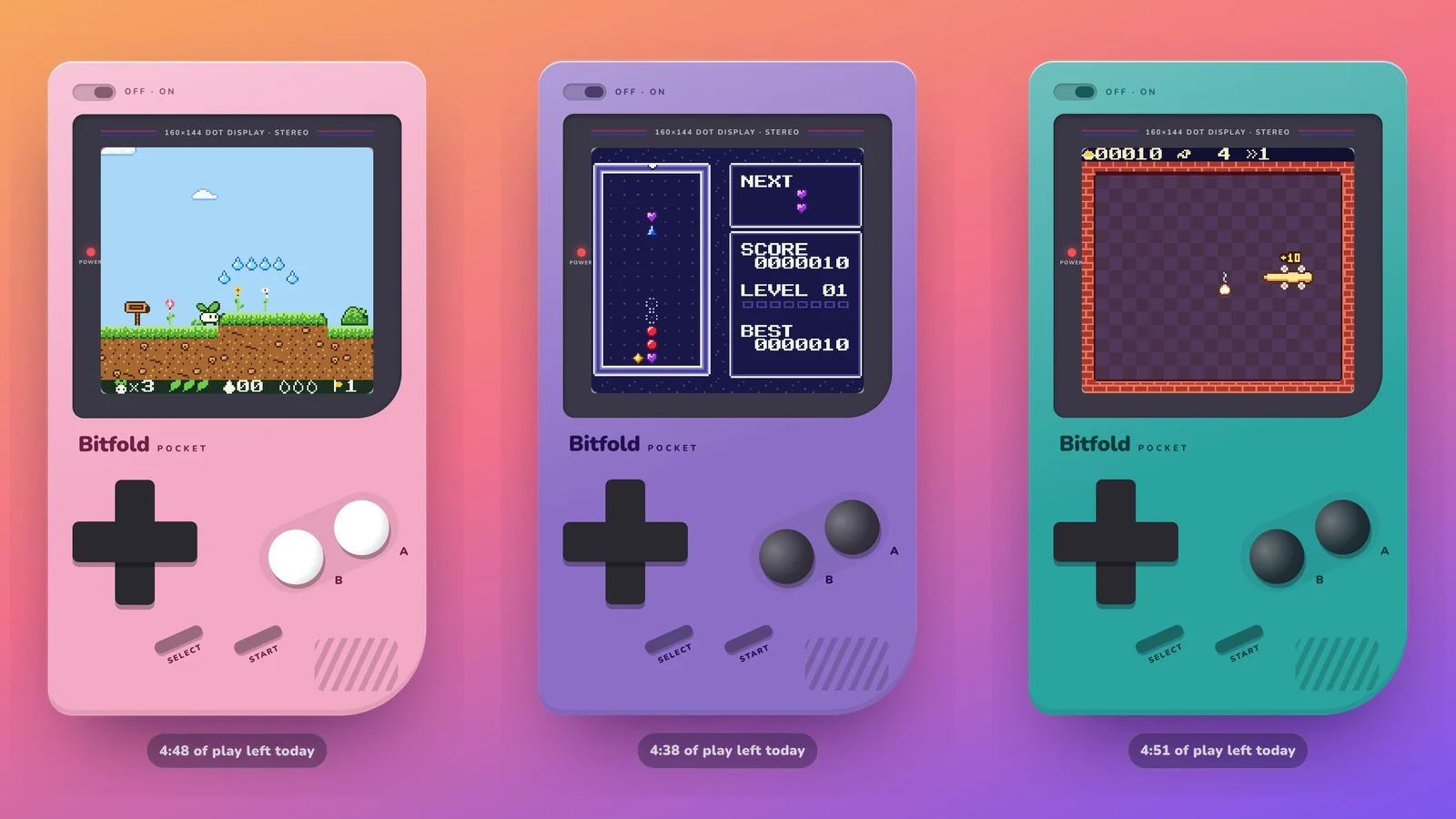
Bitfold is the retro game console app we built for iPhone and iPad, made for iPhone Duo, and it’s on its way to the App Store this week. It fills the screen with a pocket console, with a D-pad, A and B, Start and Select, a power LED and a speaker grille, and it comes with ten original games we wrote for it.
You can play three of those games now, free, at bitfold.9io.ai/play. This post covers what Bitfold is, how it changes shape on iPhone Duo, how we kept its timing and sound right, and how we fitted a real emulator and three games into 107 KB for the browser.
What Bitfold is
Bitfold fills the whole screen with a handheld console. It has a glossy shell, a pixel-sharp screen, a clicky D-pad, A and B, Start and Select, a power LED and a speaker grille. It comes in twelve colour editions, from the warm grey Classic to a see-through Atomic purple with a circuit board inside, and each edition has a matching Home Screen icon.
Emulation runs on SameBoy, an open-source, cycle-accurate core under the MIT licence. Around it we built the parts that make it feel like a device in your hands. There’s a Metal renderer with sharp or pixel-perfect scaling, a pixel grid, dot-matrix shadows and LCD blur, and twelve screen palettes for monochrome games. Every press gets a Core Haptics click. You can hold a button to rewind, fast-forward up to 8× with pitch-shifted audio and use four save-state slots, and the app saves and resumes on its own. Bluetooth game controllers and hardware keyboards work too.
Turning it on is a small ritual. The power LED lights up, the Bitfold wordmark drops onto the screen and a two-note chime plays. Sliding the power switch turns it off.
Bitfold has no ads, no accounts and no tracking, and it never connects to the internet. Games, saves and settings stay on the device.
Ten original games, built as real cartridges
The ten games in the box are Bitfold Originals. We wrote each one for Bitfold, with its own code, art, music and characters, using GBDK-2020, an open-source C development kit for 8-bit consoles. They are real cartridge images, so they also run on original handheld hardware.
Building them as cartridges meant working within the original hardware’s limits. The smallest are 32 KB and the largest 128 KB, and all ten together come to 800 KB.
| Game | Genre | What it is | Cartridge |
|---|---|---|---|
| Sprout’s Quest | Platformer | Four worlds, a seedling with a flutter jump, hidden golden seeds | 128 KB |
| Lantern Keep | Action-adventure | Relight five beacons in a shadow-filled keep, with tools, puzzles and bosses | 128 KB |
| Nova Courier | Vertical shooter | Three sectors and three multi-phase guardians | 64 KB |
| Turbo Lane | Pseudo-3D racer | Raster-bent roads, seven rivals, three roads you earn by winning | 64 KB |
| Prism Drop | Falling-gem puzzle | Chains and prism gems, in Marathon or Sprint | 32 KB |
| Tidepool Pinball | Pinball | A two-screen reef table with multiball | 128 KB |
| Pixel Postcards | Picture logic | 45 solver-verified puzzles that reveal postcards from a journey | 64 KB |
| Pocket Links | Mini golf | 18 holes on two courses | 128 KB |
| Noodle | Snake | Classic mode plus ten three-star stages | 32 KB |
| Brick Bounce | Block breaker | Fifteen picture stages and seven power-ups | 32 KB |
You can also play cartridges you own. Back them up with a cartridge reader and import the .gb, .gbc or .zip files from Files, AirDrop or iCloud Drive. Imported games get label art captured from your first minutes of play. Bitfold doesn’t include or download any commercial games.
One console, every shape of the phone
On iPhone Duo, Bitfold picks the right console for the shape of the phone and keeps your game running through every change.
| How you hold it | What Bitfold shows |
|---|---|
| iPhone Duo, closed | A Bitfold Pocket, the classic brick, on the outer display |
| Folded like a laptop | A clamshell, with the game on the top half, controls and a companion screen below, and the console’s hinge drawn over the real fold |
| Folded like a book | The console opens into two pages, so nothing sits on the crease |
| Any iPhone | The classic console in portrait, and a wide layout when you turn the phone sideways |
| iPad | The clamshell, with a shelf you can drag cartridge files onto |
Three decisions made this work.
Ask the system where the fold is. Bitfold reads the region the hinge occupies from iOS, which added the API in iOS 27.1, so the drawn hinge lands exactly on the real one. Nothing about the fold’s position is hard-coded.
Keep everything off the crease. A button that straddles the fold is hard to press, and a game screen split across it looks broken. That’s why the book layout splits the console into two pages instead of stretching one across the fold.
Keep the game running. Folding the phone mid-level doesn’t pause or reset anything. Bitfold plays a soft click as the hinge snaps into the new layout, and the game carries on. Because the Simulator starts iPhone Duo closed, geometry tests check the unfolded layouts in code.
Timing, sound and touch
Games feel wrong long before they look wrong, so most of the engineering went into timing.
Bitfold runs the emulator on its own thread, one frame per display refresh. The original handheld’s screen refreshes at about 59.73 Hz, and a phone’s display refreshes at 60 Hz or more. Locking emulated frames to the display makes the audio drift slowly out of step. Bitfold keeps the frames locked anyway and adjusts the audio playback rate by up to 0.5% to stay in sync, which avoids both dropped frames and audio crackle. Samples reach AVAudioEngine through a lock-free ring buffer, so the audio thread never waits on the emulator.
The controls are multi-touch, so you can roll your thumb from one button to the next. The D-pad works out its direction from the angle of your thumb, with eight directions, and every press plays a haptic click. Cartridges that rumble shake the phone.
An engine with no UI, tested on Linux
Bitfold keeps the emulator and everything around it in a Swift package with no UI framework, and the app is a thin SwiftUI layer on top. The package, BitfoldKit, wraps the emulator core in a Swift API and builds on macOS and Linux. Its tests cover pixel-exact rendering, save states, audio and archive handling. It also ships a command-line runner that plays a cartridge headless for a set number of frames and writes a PNG.
CI runs the engine tests on Linux, builds the app for the Simulator and for devices, and captures the app’s screenshots on iPhone, iPhone Duo and iPad.
We set up client apps the same way in our product engineering work. The logic that matters lives where a test can reach it without a device, and the UI stays thin enough to check with screenshots.
Putting Bitfold in a browser
The browser player at bitfold.9io.ai/play runs the same cartridge images as the app, on a different emulator. For the web we used binjgb, a small open-source emulator written in C and compiled to WebAssembly, also under the MIT licence. With all three games, the player is 107 KB over the wire.
| File | What it is | Size | Gzipped |
|---|---|---|---|
| binjgb.wasm | The emulator, compiled to WebAssembly | 88.3 KB | 35.2 KB |
| binjgb.js | The loader the compiler generates | 13.6 KB | 4.3 KB |
| player.js | Our run loop, input, audio and time limit | 11.5 KB | 4.6 KB |
| sprout.gbc | Sprout’s Quest | 131.1 KB | 30.4 KB |
| prism.gbc | Prism Drop | 32.8 KB | 15.0 KB |
| noodle.gbc | Noodle | 32.8 KB | 18.0 KB |
| Total | 310.1 KB | 107.4 KB |
Cartridge images compress well, and so does WebAssembly, but neither was on our server’s gzip list. We added both types before the numbers in the right-hand column were true.
Each animation frame, the player works out how much real time has passed, converts it to CPU cycles (the handheld’s CPU runs 4,194,304 a second) and runs the emulator until it reaches that count. When the emulator reports a new frame, the player copies the 160×144 RGBA buffer into a canvas. When its audio buffer fills, the player schedules it on Web Audio 100 ms ahead. Catch-up is capped at 1/12 of a second per animation frame, so after a long frame the game slows for a moment and doesn’t race ahead to catch up.
Two bugs worth knowing if you embed binjgb
The buttons did nothing. binjgb’s set_joyp_* functions store the button state, but the emulator only reads it through a joypad callback. The reference player installs one inside its rewind setup, which is easy to miss if you leave rewind out. Two calls fix it:
const joypad = mod._joypad_new();
mod._emulator_set_default_joypad_callback(emu, joypad);
Quick taps went missing. A key press or a tap can start and end between two animation frames, on a slow phone or whenever a frame runs long. The game never sees a button that went down and up between two of its reads. The player now counts emulated frames and holds every press for at least two of them:
function press(button, down) {
  if (down) { downAt[button] = frames; setButton(button, 1); }
  else if (frames - downAt[button] >= 2) setButton(button, 0);
  else pendingRelease.add(button);   // released once two frames have run
}
The rest is housekeeping. The game pauses when the tab is hidden. The on-screen D-pad works out the direction from the angle of your thumb, with eight directions like the app. Buttons capture the pointer, so a press always gets its release, even if your thumb drifts off the button.
Five free minutes a day
The browser player gives you five minutes of play a day. The clock runs only while a game is powered on and the tab is visible, and a countdown sits on the console’s top edge. When the minutes run out, the console shows the App Store button and how long until the allowance resets at midnight UTC.
The limit lives in your browser’s local storage, so clearing site data resets it. We chose that on purpose. Enforcing it on a server would mean accounts or fingerprinting, and Bitfold has neither.
How we measured
File sizes are what the live server sent on 26 October 2026, measured with curl with and without gzip. Cartridge sizes come from the app’s game catalogue. We tested the browser player in Chrome on macOS and in a phone-sized viewport, including the time limit, and in Safari on the iOS Simulator, where we checked sound and the on-screen buttons. We haven’t measured frame timing or battery use on real phones yet. The app’s frame rate and audio figures come from its source code and tests.
What we’d do again
- Build the games as real cartridges, so the original hardware’s limits keep them small.
- Put the engine in a package with no UI framework, so it runs headless, on Linux and in CI.
- Ask the system where the fold is, and test the unfolded layouts in code.
- Lock frames to the display and adjust the audio rate to stay in sync.
- Hold quick button presses for a couple of frames whenever input and the game loop run at different rates.
- For a web demo, ship the real game, keep it small, and count only the time someone spends playing.
Our other launch this week is Football Kick, a football game that turns iPhone Duo’s fold into a goal line. Both games live on 9io.ai/games.
Frequently asked questions
What is Bitfold?
Bitfold is a retro game console app for iPhone and iPad, made for iPhone Duo. It comes with ten original games and twelve colour editions, and it has no ads, accounts or tracking.
Is Bitfold a retro game emulator?
Yes. Bitfold is built on the open-source SameBoy core. It plays the ten Bitfold Originals that come with it, and backups of cartridges you own.
Can I play Bitfold in a web browser?
Yes, three of the games. Sprout’s Quest, Prism Drop and Noodle play free at bitfold.9io.ai/play for five minutes a day. The app has all ten, with no time limit.
Do I need an iPhone Duo to use Bitfold?
No. Bitfold runs on iPhone and iPad with iOS 17 or later. On iPhone Duo it adds a pocket console on the outer display and a clamshell when you open it.
When is Bitfold on the App Store?
Bitfold is on its way to the App Store. The download button on bitfold.9io.ai switches on the day it goes live.
Does Bitfold collect any data?
No. There are no accounts, analytics, ads or tracking, and the app never connects to the internet. The browser player keeps only your daily play time, in your own browser’s storage.
Building something like this?
9io is a small team of senior engineers with a fractional CTO. We work by the hour, and plans start at $5,000. Send us a note about your product. The reply comes from the person who'd do the work.