
Key takeaways
- Folded like a laptop, iPhone Duo becomes a pitch on the table and a goal standing up.
- One finger shapes every shot: swipe speed is power, length is height, a curve bends it.
- Physics runs in fixed 1/600-second steps, so a replay is exactly the kick you hit.
- The keepers only see the ball, with their own reaction times, reading errors and reach.
- The browser game runs the app’s own engine, ported to JavaScript and checked against Swift.
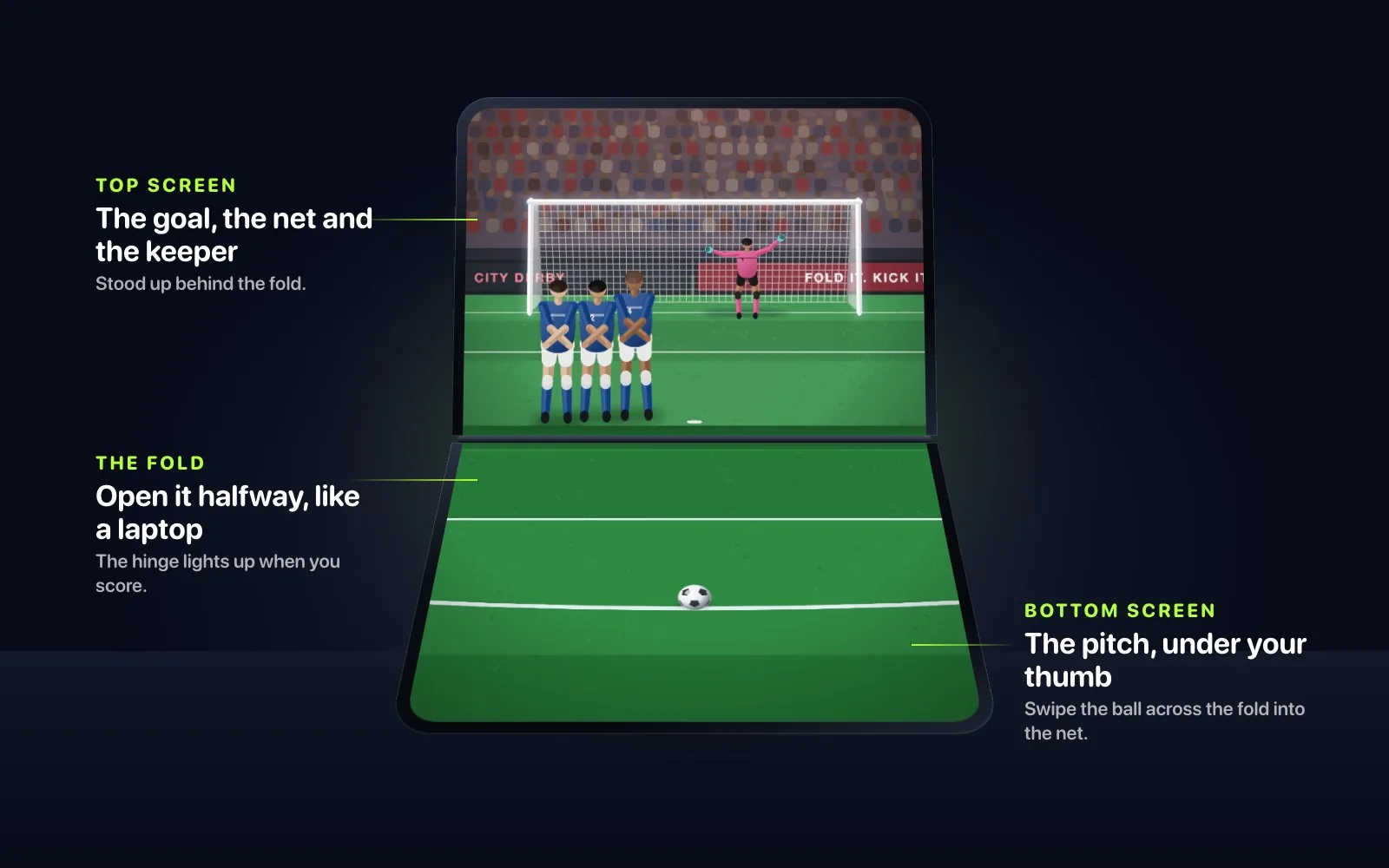
Football Kick is a one-finger football game we built for iPhone and iPad, made for iPhone Duo, and it’s on its way to the App Store. Fold iPhone Duo like a laptop and stand it on a table. The bottom half lies flat as the pitch and the top half stands up as the goal. You swipe through the ball on the table and it flies across the fold into the net.
You can play it right now, free, at footballkicks.9io.ai. This post covers how the game uses the fold, how a one-finger swipe becomes a shot, how the physics and keepers work, how we test a game without a phone, and how the app’s own engine ended up running in the browser.
The fold becomes the goal line
Football Kick started from one observation. An iPhone Duo folded like a laptop and stood on a table already looks like a pitch with a goal at the far end. Both halves are drawn from one virtual camera, so the ball crosses the hinge without a jump. As you fold the screen up, the goal swings up into place and the floodlights come on bank by bank. When you score, the hinge lights up like goal-line technology, and the best goals come back as an instant replay on the standing half, which becomes the stadium’s big screen while the pitch stays on the table.
Each way of holding the phone gets its own view.
| How you hold it | What Football Kick shows |
|---|---|
| Folded like a laptop | The pitch on the flat half and the goal standing up behind the fold |
| Folded like a book | A camera behind the net on one page, and the main view under your hand on the other, on whichever side you prefer |
| Closed, or any iPhone | One screen, with the goal at the top and the ball at the bottom |
| iPad | The same game on the big screen |
The game reads the fold’s position from iOS, which added the API in iOS 27.1, and listens for hinge changes, so nothing about the fold is hard-coded. A layout test places the HUD on every iPhone and iPad size and in every iPhone Duo posture, and fails if anything is off screen, overlaps something else, or sits on a bent part of the fold.
One finger, three ways to shape a shot
The controls fit in one finger. Swipe speed is shot power. On iPhone Duo’s flat half, a longer swipe lifts the ball higher; on a phone, the point where your finger ends up on the goal is where you’re aiming. Bow the swipe and the ball bends with it, round the wall and away from the keeper. Flags and a wind badge show what the wind is doing, and soft shots drift more.
A fast flick is over in a few frames, so the game reads every coalesced touch sample through a UIKit layer. Every point the screen reported counts, including the ones between frames, which matters most for the fastest flicks.
In a shootout you go in goal as well. Tap where to dive, and don’t go too early, because the shooter can see you.
Physics in fixed steps
Football Kick runs its match at up to 120 Hz and its physics in fixed steps of 1/600 of a second. Fixed steps make the simulation deterministic: the same swipe always produces the same kick. That’s what makes the instant replay possible, because the replay runs the exact kick again, from a long lens behind the shooter.
The ball has drag, lift from spin and spin that decays in flight. The wind gusts and swirls. The ball bounces and skids on wet grass, rings off the posts and crossbar, and lands in a net made of springs. When something special is about to happen, like a shot hitting the woodwork, a fingertip save or a ball heading for the top corner, time slows down for a moment.
Rendering stays cheap. The stadium behind each view is drawn once into an image, and each frame redraws only what moves.
Keepers who only see the ball
The keepers react to the ball. Each one has a reaction time, a reading error, a habit of guessing, and arms and legs that can reach the shot or can’t. The better ones learn your favourite corner as a match goes on. Wet gloves spill shots, a fingertip save can still go in off the post, and a wall blocks the keeper’s view.
| Keeper | How he plays |
|---|---|
| Theo Lund, The Apprentice | First day in goal. Put it in the corners. |
| Gus Pemberton, Big Gus | Fills the goal and loves diving to your left, but he’s slow getting down |
| Rafa Ortega, El Gato | A showman with a weakness up high |
| Viktor Hale, The Lighthouse | 1.98 metres tall. Keep it low. |
| Kenji Arata, The Reader | Remembers where you shoot, and reads spin |
| Idris Okafor, The Octopus | Reads everything. Beat him with pace and the corners. |
What’s in version 1.0
Version 1.0, which we’re finishing now, is built around a World Tour of thirty levels across six grounds, each with its own keeper and weather. It runs from the Training Ground at golden hour and a muddy Sunday League park to a sold-out City Derby at dusk, the Storm Cup in sideways rain and lightning, Continental Nights under the floodlights and the World Final. Levels mix penalties, free kicks over and around walls that jump, shots from the edge of the box and from 28 metres, moving targets and crosswinds, with three stars to earn on each.
| Mode | How it works |
|---|---|
| Just Kick | The easy way in: one tap from the home screen, no wind, a friendly keeper and a helping hand on every swipe |
| Quick Play | Ten kicks at Rookie, Pro, World Class or Legend, as penalties, free kicks, long range or mixed |
| Streak | Keep scoring until you miss |
| Shootout | Five penalties each, then sudden death. Against a friend on iPhone Duo, the shooter swipes on the flat half and the keeper dives on the standing goal. |
| Daily Kick | Five kicks, the same for everyone that day |
| Practice | Pick the kick, the keeper, the wind, the targets and the ground |
Scoring rewards style. There are bonuses for top bins, bottom corners, curlers, rockets, goals in off the woodwork, beating the wall, Panenkas and scoring through a strong wind, and consecutive goals multiply the score, up to ×2.
A game you can test without a phone
KickKit holds the whole of Football Kick, including the physics, keepers, walls, swipe reading, every mode and the renderer, in plain Swift with no UI framework. The renderer draws into display lists, which the app turns into SwiftUI Canvas drawing and the command-line tool turns into SVG. The package runs and is tested on Linux.
That makes the game testable at a scale a phone can’t reach. A balance tool plays every level thousands of times with simulated players to set the star thresholds, so the three-star scores come from data. Other commands print shot outcomes, keeper ratings, swipe calibration and the drawing cost of each frame. Even the app’s own code is type-checked on Linux, against a stand-in for the parts of the iOS SDK it uses, with the real signatures.
Every sound in the game is synthesised by a script, from the kick and the ping of the post to rain, thunder and crowds built from dozens of synthesised voices. None of it is sampled.
We set up client apps the same way in our product engineering work, so the logic that matters lives where a test can reach it without a device.
The app’s engine, in your browser
The game on footballkicks.9io.ai is the app’s engine ported to JavaScript: one dependency-free module of 225 KB, which the server sends as 77 KB gzipped. It is a port of KickKit, not a look-alike. The swipe reading, kick solver, ball flight, spring net, keeper brain and scoring are the same, run in the same fixed 1/600-second steps, in metres, with a regulation goal 7.32 metres wide and 2.44 high and the penalty mark 11 metres out1. Even the random numbers match: the port reimplements the engine’s SplitMix64 generator with BigInt, so a seeded kick plays out bit for bit the same.
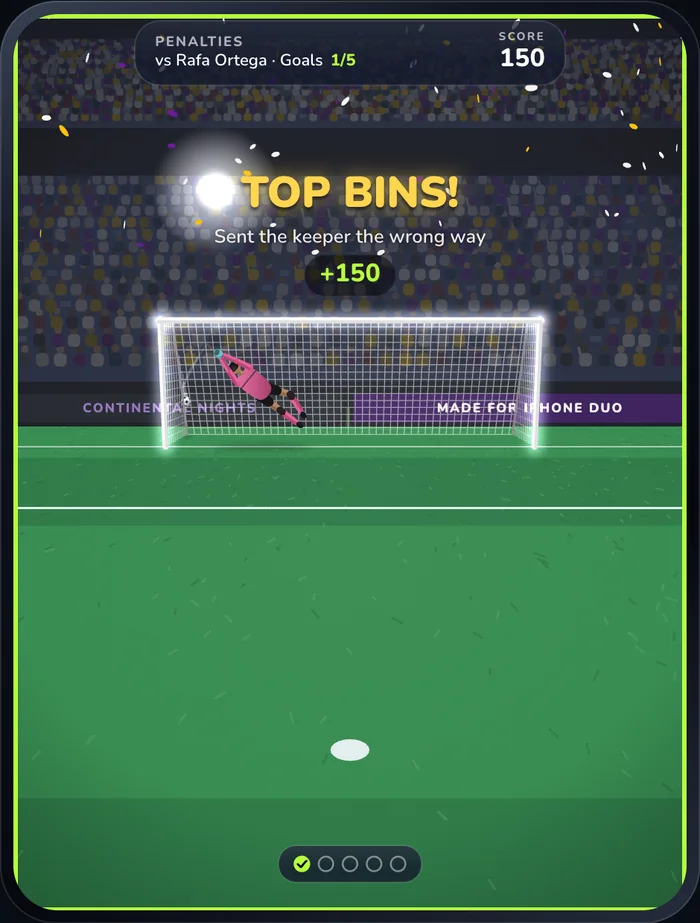
Parity tests hold it to that. Thirteen kicks captured from KickKit’s command-line tool, covering goals, the post, wide and over, bends, a 25-metre shot and keepers of different ratings saving, parrying and getting beaten, match the Swift timelines line for line. A table of 3,600 penalties across keeper ratings and target zones comes out identical. The rest of the suite mirrors the Swift tests for swipes, physics, keepers and game rules.
It plays three modes. Just Kick is endless and friendly, with Theo Lund in goal, no wind and a helping hand on every swipe. Penalties is five kicks against Rafa Ortega under the lights. Streak goes on until you miss, with a better keeper taking over every few goals. Free kicks, walls, the World Tour, sound and the iPhone Duo views stay in the app.
You get five minutes of play a day. A second counts only if you touched the pitch or kicked in the last 20 seconds and the tab is visible, so leaving the page open doesn’t use up your time. After a round the page shows the App Store button, and when the minutes run out it shows how long until they reset at midnight UTC. The allowance lives in your browser’s local storage, so there are no accounts and no tracking, and clearing site data resets it.
How we measured
The 77 KB figure is what the live server sent on 26 October 2026, measured with curl with gzip. The parity figures come from the port’s own test suite, which compares it with output captured from the Swift engine. We tested the browser game in Chrome on macOS, including the modes, the HUD and the time limit. The app’s frame rate, physics step and keeper behaviour come from its source code and tests. We haven’t measured them on an iPhone Duo for this post.
What we’d do again
- Design around the way people will hold the device. A phone folded on a table suggested the whole game.
- Use a fixed physics step, so a replay is the same kick run again.
- Read coalesced touches for anything fast, so a flick is measured from all its samples.
- Give the computer player only what a real player would see, and let reach and reaction time decide saves.
- Keep the game in a package with no UI framework, so CI can play it thousands of times, and so it can be ported with tests that prove the port.
- Count only active play when you put a time limit on a free demo.
Our other launch this week is Bitfold, a retro game console app with ten original games you can try in your browser. Both games live on 9io.ai/games.
-
The IFAB, “Law 1: The Field of Play”, https://www.theifab.com/laws/latest/the-field-of-play/ ↩
Frequently asked questions
What is Football Kick?
Football Kick is a one-finger football game for iPhone and iPad, made for iPhone Duo. Folded like a laptop, the pitch lies flat on the table and the goal stands up behind the fold, and you swipe through the ball to shoot.
How do you shoot in Football Kick?
Swipe through the ball towards the goal. Swipe speed is power, a longer swipe lifts the ball, and a curved swipe bends it round the wall and away from the keeper.
Do I need an iPhone Duo to play Football Kick?
No. It runs on iPhone and iPad with iOS 17 or later. On iPhone Duo, folding the phone like a laptop puts the goal on the standing half and the pitch on the flat half.
Can I play Football Kick in a browser?
Yes. footballkicks.9io.ai runs the game’s own engine in Just Kick, Penalties and Streak, free for five minutes of play a day. The full game adds free kicks, long-range shots, six keepers and a thirty-level World Tour.
When is Football Kick on the App Store?
Football Kick is on its way to the App Store. The download button on footballkicks.9io.ai switches on the day it goes live.
Does Football Kick collect any data?
No. It has no ads, accounts or tracking, and it works offline.
Building something like this?
9io is a small team of senior engineers with a fractional CTO. We work by the hour, and plans start at $5,000. Send us a note about your product. The reply comes from the person who'd do the work.