
Key takeaways
- Bitfold reads iPhone Duo’s fold from iOS 27.1 reserved regions, including the inactive fold while flat.
- A drawn hinge covers the fold in the laptop posture, and the book posture splits the console into pages.
- A posture change only moves views. The emulator thread and the Metal screen carry on.
- The 160 × 144 picture scales sharply by default; Pixel-Perfect Scaling gives up 4% to 10% of width.
- Layout is one pure function of size and fold, tested on 42 screen configurations.
Bitfold asks iOS 27.1 where iPhone Duo’s fold is and builds its console around the answer. Closed, the outer display gets the classic brick. Folded like a laptop, the console becomes a clamshell, with the game on the upright half, the controls and a small companion screen on the flat half, and the console’s own hinge drawn over the real fold. Folded like a book, it opens into two pages so nothing sits on the crease. The game keeps running through every change, because a change of posture only moves views.
We make Bitfold, a retro game console app for iPhone and iPad. As of 30 October 2026 it’s on its way to the App Store, and three of its games play free at bitfold.9io.ai/play. Our launch post says what Bitfold is, and our guide to iPhone Duo app development covers the fold APIs for any app. This post is the design and engineering behind Bitfold’s layouts, taken from its source code and layout tests.
The post goes posture by posture, then through the code behind each decision, and ends with a checklist for teams designing for the fold.
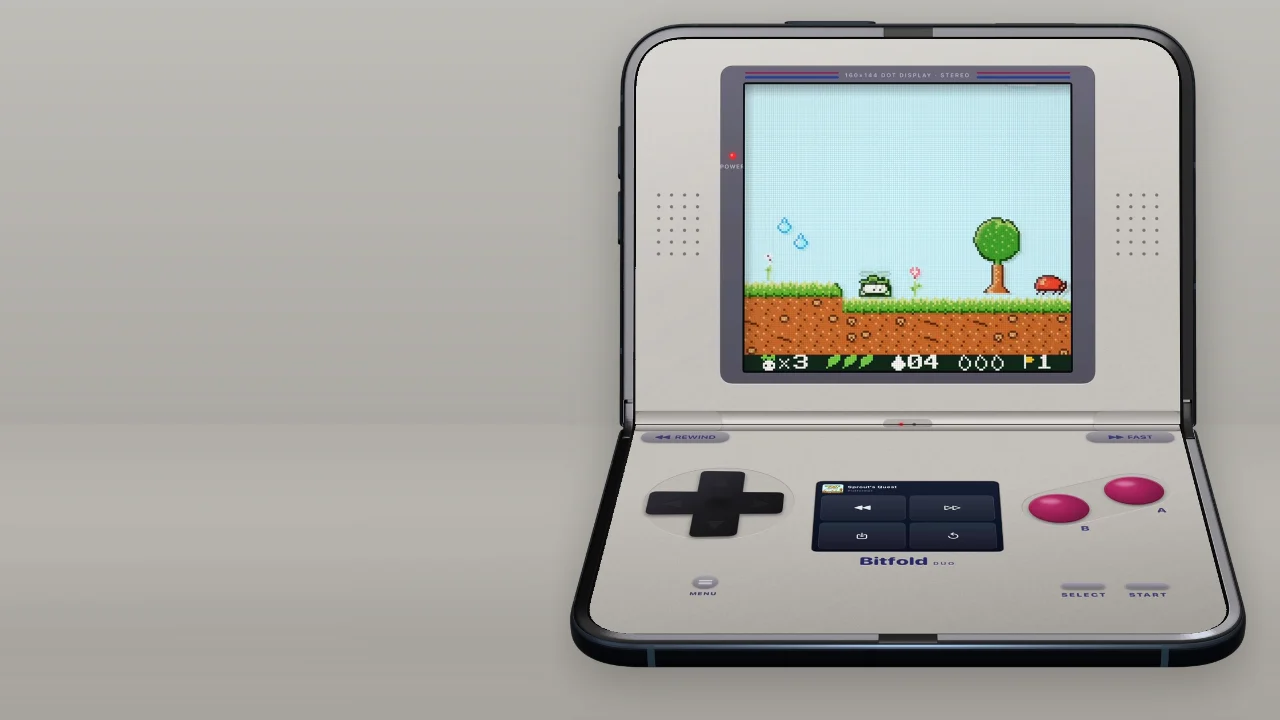
What Bitfold shows in each iPhone Duo posture
Bitfold draws one of four consoles. The classic is the original brick, with the screen above the controls. The clamshell puts the screen above a hinge and the controls below it. The wide layout puts the screen in the middle with controls either side, and the book splits the console into two pages. Which one you get depends on the fold on iPhone Duo and on the screen’s proportions everywhere else.
| How you hold it | What iOS reports | What Bitfold shows | Why |
|---|---|---|---|
| iPhone Duo closed, upright | No fold on the outer display | The classic brick, labelled Bitfold Pocket | A phone-shaped screen suits the original layout |
| Closed, sideways | No fold | The wide layout | Under 700 points on the short side, too short for a clamshell |
| Open flat, upright | An inactive fold across the middle | The clamshell, with its hinge already on the fold line | Folding it into a laptop then barely moves anything |
| Folded like a laptop | An active fold across the middle | The clamshell, with the game above the hinge and the controls below | The upright half is for watching, the flat half for thumbs |
| Open flat, sideways | An inactive fold down the middle | The wide layout, with the screen across the middle | A drawn hinge down a flat display would look odd |
| Folded like a book | An active fold down the middle | Two pages, with the screen and D-pad on the left and the companion screen, A and B on the right | Nothing may cross the crease |
| Any other iPhone, upright | No fold | The classic brick | Much taller than wide |
| Any other iPhone, sideways | No fold | The wide layout | Under 700 points on the short side |
| iPad, sideways | No fold | The clamshell, with the hinge at mid-height | Near-square, with at least 700 points on the short side |
| iPad, upright | No fold | The classic brick, or the clamshell if you choose it in Settings | Taller than wide |
The clamshell follows Apple’s advice for a phone standing on a table. Its layout talk for iPhone Duo suggests the upright half for content people watch from a distance and the flat half for interactive controls.1 The design guidelines ask for a game that stays playable in every pose and fills the screen, preferring a new aspect ratio to black bars, with artwork in any padding that’s left.2 A 160 × 144 game can’t change its aspect ratio, so the console shell is the artwork. The picture keeps its 10:9 shape and the plastic fills the rest of the display.
The two flat rows are design choices. Upright, the flat phone already has its hinge where the fold will be, so folding it into a laptop barely moves anything. Sideways, folding it into a book is the one fold of the open phone that rearranges the console. Apple asks apps to move only what’s necessary when the device folds,2 and here the screen has to move, because the wide layout puts it across the middle of the display.
Settings has a Layout option with Automatic, Classic, Clamshell and Wide. A bent fold overrides it, so the laptop posture always gets the clamshell and the book posture always gets the two pages. The setting applies while the display is flat or has no fold.
Reading the fold with reservedRegions
Bitfold doesn’t hard-code where the fold is. The console sits inside a GeometryReader, and every layout pass asks the proxy for division regions, the kind of reserved region iOS 27.1 uses for a fold.3 The call looks like this, with ConsoleFold as our own small type:
func fold(in proxy: GeometryProxy) -> ConsoleFold? {
    guard #available(iOS 27.1, *) else { return nil }
    let regions = proxy.reservedRegions(kind: .division,
                                        options: .includeInactive,
                                        layoutDirectionBehavior: .fixed)
    guard let region = regions.first else { return nil }   // iPhone Duo has one fold
    // Region frames start inside the safe area; the console starts at the screen's corner.
    let inset = proxy.safeAreaInsets
    return ConsoleFold(frame: region.frame.offsetBy(dx: inset.leading, dy: inset.top),
                       isActive: region.isActive)
}
.includeInactive does the most work. By default the method returns only active regions, and the fold is active only while the phone is partly folded.3 Lying flat, the fold is an inactive region with a width of zero, as Apple’s layout talk puts it.1 Bitfold asks for it anyway and lays out the clamshell around that line, so the hinge is already on the fold before anyone bends the phone. Apple gives the same reason for the option: an inactive region still has a frame, so you can leave room for it and the layout doesn’t jump when it becomes active.3
The frame comes back in points, in the coordinates of the view that asked, with Apple’s margins around the fold already included.3 The GeometryReader’s coordinates start inside the safe area, while Bitfold lays its console out from the screen’s top corner, so the frame is shifted by the leading and top insets before anything uses it. Without that shift, the drawn hinge would sit one top inset away from the real fold.
.fixed asks for frames that aren’t mirrored for right-to-left languages.3 Bitfold’s console geometry, including the UIKit view that turns touches into button presses, works in plain top-left coordinates, so the fold has to arrive in the same form. On iOS 17 to 27.0, and on any screen without a fold, the function returns nil and Bitfold decides by the screen’s proportions alone.
Why Bitfold leaves the iOS 27.1 hinge angle alone
iOS 27.1 also reports the hinge itself. SwiftUI’s onHingeChange hands you the old and new hinge context, with a status of closed, partially open or fully open and an angle.4 Bitfold never reads the angle. Apple’s UIKit documentation says the rate and precision of angle updates are up to the system and can change, and suggests the status if that’s all you need.4 Layout needs a rectangle, and the reserved region already is one.
Bitfold uses the status for one effect. When the status changes between partially open and fully open, the app plays a light haptic click, so laying the phone flat or folding it up feels like a lid snapping into place. Changes to and from closed don’t click. Layout never waits for a hinge event, because the geometry update already carries the new fold.
One function picks the layout
Everything above feeds one function. It takes the screen’s size and insets, the fold and the settings, and returns a rectangle for every part of the console, from the screen to the area where menus may open. The file imports only Foundation and Core Graphics, so a test can call it with any screen and any fold, without a real iPhone Duo or a folded Simulator. The views put each part where the geometry says.
The first decision is the shape. This sketch shows the order of the checks with the Automatic setting; the other settings swap in their own limits.
func style(for size: CGSize, fold: ConsoleFold?) -> ConsoleStyle {
    if let fold {
        let acrossScreen = fold.frame.width >= fold.frame.height
        if acrossScreen { return .clamshell }                 // laptop, or flat and upright
        if fold.isActive { return .book }                      // nothing may straddle the crease
        return size.width >= size.height ? .wide : .classic   // flat and sideways
    }
    let aspect = size.width / size.height
    if aspect < 0.92 { return .classic }
    if aspect <= 1.75, min(size.width, size.height) >= 700 { return .clamshell }
    return .wide
}
Without a fold, proportions decide. A screen narrower than 0.92 of its height gets the classic brick. A clamshell halves the height left for the picture, so it needs a big screen, no more than 1.75 times as wide as it is tall and at least 700 points on the short side. In practice that means an iPad held sideways. Everything else gets the wide layout, which leaves about 150 points either side of the screen for each thumb.
Drawing the console’s hinge over iPhone Duo’s fold
In the clamshell, the hinge is part of the console, a bar in the edition’s colours with a knuckle at each end. Its height starts at 24 points or 3.4% of the screen’s height, whichever is larger, which is about 32 points on the inner display. If the fold region iOS reports is taller, the hinge grows to cover it, up to 12% of the height. The hinge is centred on the fold, and the rest of the console keeps clear of both the hinge and the fold region.
Above the hinge, the screen and its bezel nearly fill the upright half, with speaker grilles either side when there’s room. Below it, the D-pad sits under the left thumb and A and B under the right, with rewind and fast-forward buttons at the top corners. Select and Start sit near the bottom on the right, with the menu button under the D-pad. On a tall, narrow clamshell like the open iPhone Duo, the D-pad takes 23.5% of the width (21% on a wide one), about 157 points.
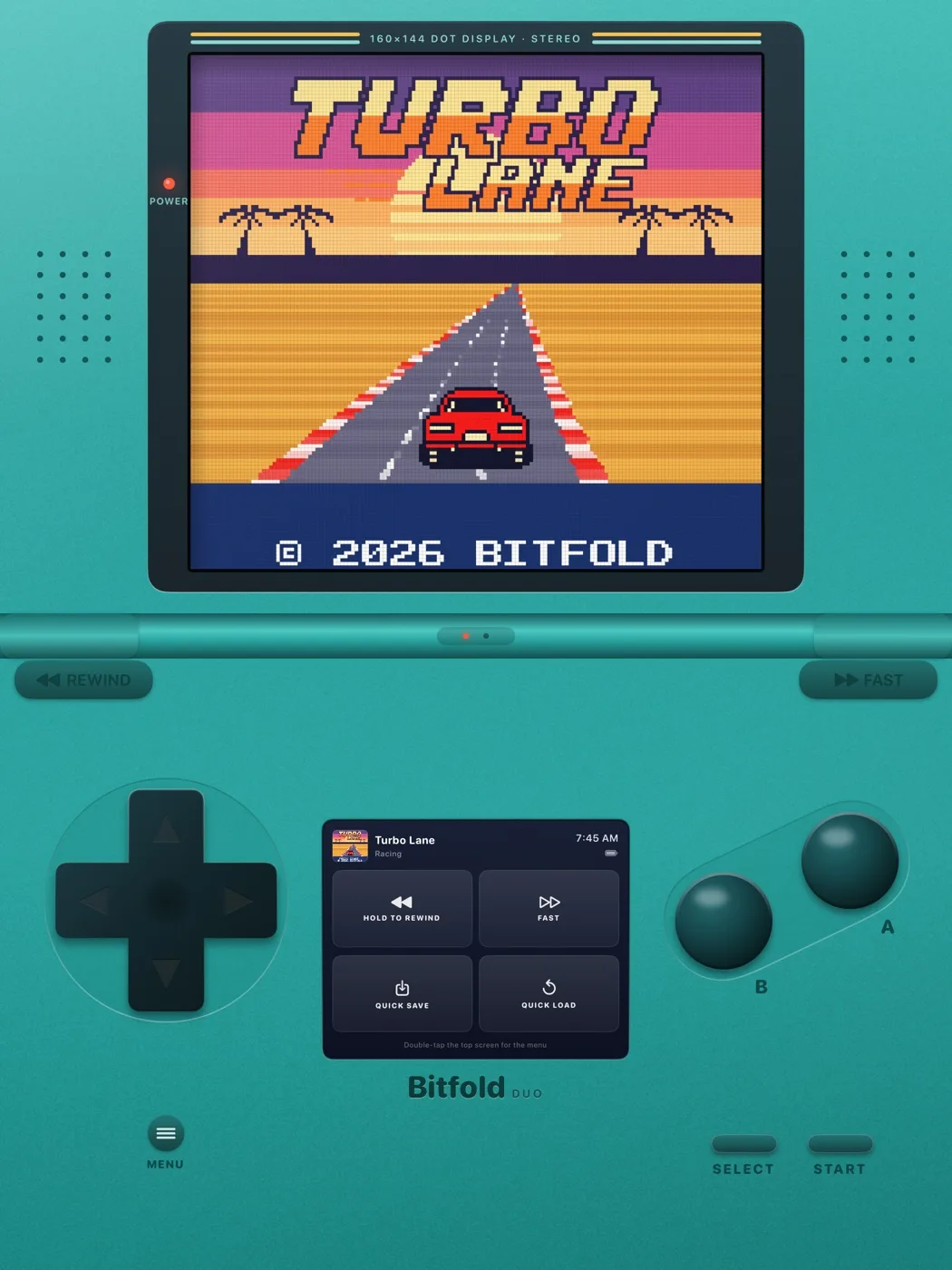
The companion screen sits between the thumbs. It shows what’s playing and has tiles for hold-to-rewind, fast-forward, quick save and quick load. With room to spare it adds labels, the time, the battery level and a hint about the menu gesture. Below 300 points wide or 210 tall it drops those extras and keeps large icons. On the open iPhone Duo the gap between the thumbs is under 300 points, so the companion screen always runs in that compact form. Menus open on the lower half, under the thumbs, and the pause menu scrolls when half a display is too short for it.
On iPad the clamshell has no fold to follow, so the hinge sits at mid-height, and the companion screen is big enough for its full layout. The capture below is from an iPad simulator held upright with the layout set to Clamshell.
The book layout turns the hinge on its side. It runs down the fold, at least 24 points wide and at most 10% of the display’s width. The left page holds the screen, with the D-pad below it and Select and the menu button in the corner by the hinge. The right page holds the wordmark, the companion screen level with the game screen, A and B under the right thumb, and Start in the corner by the hinge. A page is wide enough for the companion screen’s full layout, labels and clock included. Menus open on the right page.
Keeping the game running through posture changes
As iPhone Duo opens, closes, folds and turns, iOS moves the app between displays and resizes it.5 For Bitfold that means a new size and a new fold, and nothing else. The emulator runs on its own thread, paced by a display link at 60 frames a second. It holds still only when the pause menu is open, when something like Control Center covers the app, or when the app goes to the background. Folding or turning the phone does none of those.
On the main thread, the new size and fold produce a new geometry. The console view keeps its identity, which is tied to the game, so SwiftUI moves the existing views instead of building new ones. The game screen is a Metal layer that the emulation thread draws into. When its size changes, it resizes its drawable and draws the last frame again straight away, so the picture appears at its new size without waiting for the emulator’s next frame. When the console changes shape, for example from the wide layout to the two pages, its parts move to their new places with a spring animation while the game plays on.
Sharp scaling and integer scaling on iPhone Duo
Bitfold never stretches the picture. The game draws 160 × 144 pixels, a 10:9 rectangle, and the layouts only change how many display pixels each game pixel gets. Both iPhone Duo displays work out at three display pixels per point. Apple’s screenshot specifications give 2007 × 2853 pixels for the inner display and 1398 × 2034 for the outer one,6 exactly three times the 669 × 951 and 466 × 678 points our layout tests use. Safari agrees on the inner display, at 669 CSS pixels wide upright and 951 sideways.7
By default Bitfold scales sharply. The screen takes whatever size the layout gives it, and a Metal shader keeps every game pixel square and flat, blending only a strip about one display pixel wide where two game pixels meet. Plain nearest-neighbour scaling at 7.35 display pixels per game pixel would make some pixels 7 display pixels wide and others 8.
Pixel-Perfect Scaling, off by default, aims for the largest whole number of display pixels per game pixel that fits, so that every game pixel comes out the same size. The cost is a screen 4% to 10% narrower.
| Posture | Layout | Sharp scaling | Pixel-Perfect target |
|---|---|---|---|
| Closed, upright | Classic | 5.2 | 5 |
| Folded like a laptop | Clamshell | 7.1 to 7.35 | 7 |
| Folded like a book | Two pages | 6.5 to 6.7 | 6 |
| Open flat, sideways | Wide | 8.9 | 8 |
The figures are display pixels per game pixel, worked out from Bitfold’s layout code at three pixels per point. The ranges cover the 28-point and 60-point folds in our layout tests.
The pixel grid only appears from 3 display pixels per game pixel upwards, which every iPhone Duo posture clears. Our roundup of retro game apps for iPhone Duo lists the screen filters other apps offer.
Testing every posture without unfolding the Simulator
The iPhone Duo simulator boots closed, and as of 30 October 2026 we haven’t found a supported way to unfold it from a script. So CI captures Bitfold on the closed phone only, and the open postures are checked in code.
Our layout test feeds the geometry function 42 screen configurations. They include six iPhones and four iPad sizes in both orientations, and the closed iPhone Duo both ways. The open iPhone Duo appears upright and sideways, with folds from 0 to 60 points thick, flat and bent, under several Layout settings.
Four checks run on every configuration:
- No part of the console leaves the screen, and no two parts overlap.
- Nothing crosses a bent fold, and in the clamshell nothing crosses even a flat one. The hinge’s centre must be within half a point of the fold’s centre, and menus can’t open across the fold.
- The D-pad is at least 100 points across, A at least 44 points, and the screen at least 200 points wide.
- Every layout can rewind, through a shoulder button at least 60 points wide or the companion screen’s rewind tile.
A fifth test pins the shape chosen for a laptop fold, a book fold, a flat sideways fold, an iPhone and an iPad.
Our screenshot scripts work around the Simulator in three ways. The iPhone Duo step in the CI job may fail with only a warning, so it can’t take the iPhone and iPad screenshots down with it. An iPhone Duo simulator that has been running for a while can blank its display, which gave us black screenshots, so our App Store capture script shuts each simulator down and boots it fresh first. CI also prints the help for simctl on every run and lists any command whose name mentions fold, posture, hinge or pose, so the day one appears it shows up in the log.
How we checked
Everything about Bitfold here comes from its source code, tests and scripts as of 30 October 2026. We worked out the scale figures, the D-pad size and the companion screen’s width from the layout code; they weren’t measured on a device. Apple’s API details come from its documentation, read on 30 October 2026, and the iPad picture is a simulator capture from Bitfold’s CI. We haven’t measured frame rates, battery use or touch accuracy on iPhone Duo hardware for this post.
A checklist for a foldable game layout
- Read the fold with
reservedRegions(kind: .division, options: .includeInactive)and lay out around the flat fold too, so folding moves as little as possible. - Convert the region’s frame into the coordinates your layout and touch code use, shifting it by the safe-area insets and asking for
.fixedframes where needed. - Make the layout one pure function of size, insets and fold, and let a bent fold override the player’s layout setting.
- In the laptop posture, put the picture on the upright half and every control on the flat half. In the book posture, give each side its own page.
- Cover the fold with something that belongs to your design, at least as thick as the region iOS reports, and keep everything else clear of both.
- Use the hinge status for feel, such as a haptic click, and the reserved region for layout.
- Keep the game loop out of the view hierarchy, keep view identity stable across layouts, and redraw the last frame when the drawing surface resizes.
- Never stretch pixel art. Fill the spare space with artwork, default to sharp scaling, and offer integer scaling for players who want even pixels.
- Give menus one side of the fold, and let them scroll when half a display is too short.
- Test every posture in code with a few fold thicknesses, and assert that nothing crosses the fold and that touch targets stay big enough.
-
Apple Developer, Tech Talk “Strike a pose with adaptive layouts on iPhone Duo”, transcript, read 30 October 2026, https://developer.apple.com/videos/play/tech-talks/111463/ ↩↩
-
Apple, Human Interface Guidelines, “Designing for iPhone Duo”, published 9 September 2026, https://developer.apple.com/design/human-interface-guidelines/designing-for-iphone-duo ↩↩
-
Apple Developer Documentation, “ReservedRegion” and “reservedRegions(kind:options:layoutDirectionBehavior:)” (SwiftUI), read 30 October 2026, https://developer.apple.com/documentation/swiftui/reservedregion and https://developer.apple.com/documentation/swiftui/geometryproxy/reservedregions(kind:options:layoutdirectionbehavior:) ↩↩↩↩↩
-
Apple Developer Documentation, “onHingeChange(isEnabled::)” and “DeviceHinge.Status” (SwiftUI) and “UIHinge angle” (UIKit), read 30 October 2026, https://developer.apple.com/documentation/swiftui/view/onhingechange(isenabled::), https://developer.apple.com/documentation/swiftui/devicehinge/status-swift.struct and https://developer.apple.com/documentation/uikit/uihinge/angle ↩↩
-
Apple Developer Documentation, “Preparing your app for iPhone Duo”, read 30 October 2026, https://developer.apple.com/documentation/technologyoverviews/preparing-your-app-for-iphone-duo ↩
-
Apple, App Store Connect Help, “Screenshot specifications”, iPhone Duo, read 30 October 2026, https://developer.apple.com/help/app-store-connect/reference/screenshot-specifications/ ↩
-
Jen Simmons, “WebKit Features for Safari 27.1”, WebKit blog, 23 October 2026, https://webkit.org/blog/18486/webkit-features-for-safari-27-1/ ↩
Frequently asked questions
How do you design a game layout for iPhone Duo’s fold?
Keep the game playable in every pose and keep the picture and the controls off the fold. Bitfold puts the game on the upright half and the controls on the flat half when the phone is folded like a laptop, and splits into two pages when it’s folded like a book. It reads where the fold is from iOS 27.1’s reserved regions.
Why does my layout jump when I fold iPhone Duo?
By default, reservedRegions returns only active regions, and the fold only becomes active once the phone bends. Pass includeInactive to get the fold while the phone is flat too, and lay out around it from the start.
Should I use the hinge angle for layout on iPhone Duo?
Bitfold doesn’t. Apple says the rate and precision of hinge angle updates are up to the system, and suggests the hinge status when that’s all you need. For layout, reserved regions give you the fold’s rectangle directly.
What is integer scaling for pixel art?
Integer scaling draws every game pixel as the same whole number of display pixels, so no pixel is wider than another. Bitfold’s Pixel-Perfect Scaling setting aims for the largest whole number that fits, which makes its screen 4% to 10% narrower on iPhone Duo than the default sharp scaling.
What is the iPhone Duo screen resolution?
Apple’s App Store screenshot specifications list 2007 × 2853 pixels for the inner display and 1398 × 2034 pixels for the outer display, in portrait. Safari reports the inner display as 669 CSS pixels wide upright and 951 sideways, which is three device pixels per point.
Is Bitfold on the App Store?
Not yet. As of 30 October 2026, Bitfold is on its way to the App Store. Three of its games play free in a browser at bitfold.9io.ai/play for five minutes a day.
Building something like this?
9io is a small team of senior engineers with a fractional CTO. We work by the hour, and plans start at $5,000. Send us a note about your product. The reply comes from the person who'd do the work.