
Key takeaways
- We wrote ten new 8-bit handheld games in C with GBDK-2020, from 32 KB to 128 KB each.
- Three of the ten fit in 32 KB with no banking; the other seven switch 16 KB ROM banks.
- GBDK-2020’s tools only warn when code and data overlap, so our build fails on that warning.
- All ten also run on the monochrome original, whose slower CPU sets every frame budget.
- Six of the ten use hand-written assembly in hot paths, and three hit code-generation bugs in SDCC 4.5.
GBDK-2020 is good enough to ship complete 8-bit games in C. We used version 4.5 to write ten new games for the classic 8-bit handheld, from a 32 KB snake game to a 128 KB action-adventure. They’re real cartridge images that ship inside Bitfold, our retro console app for iPhone and iPad, and they also run on original hardware. Four are written entirely in C. The other six drop into hand-written assembly for their busiest code, and three of the ten hit bugs in the C compiler.
Most of the work went into the hardware’s limits. The screen is 160 × 144 pixels and no more than 10 sprites can share a scanline. A palette holds four colours, and the CPU sees 32 KB of cartridge ROM at a time. Every game also has to run on the original monochrome model, which has half the CPU speed of its colour successor.
This post covers those limits, our toolchain, ROM banking and the build check that catches overlapping code and data, testing on the SameBoy emulator core, and one design note per game. It ends with a checklist for starting an 8-bit game today. Bitfold is on its way to the App Store as of 30 October 2026. Three of the games play free at bitfold.9io.ai/play for five minutes a day, and our launch post covers the app.
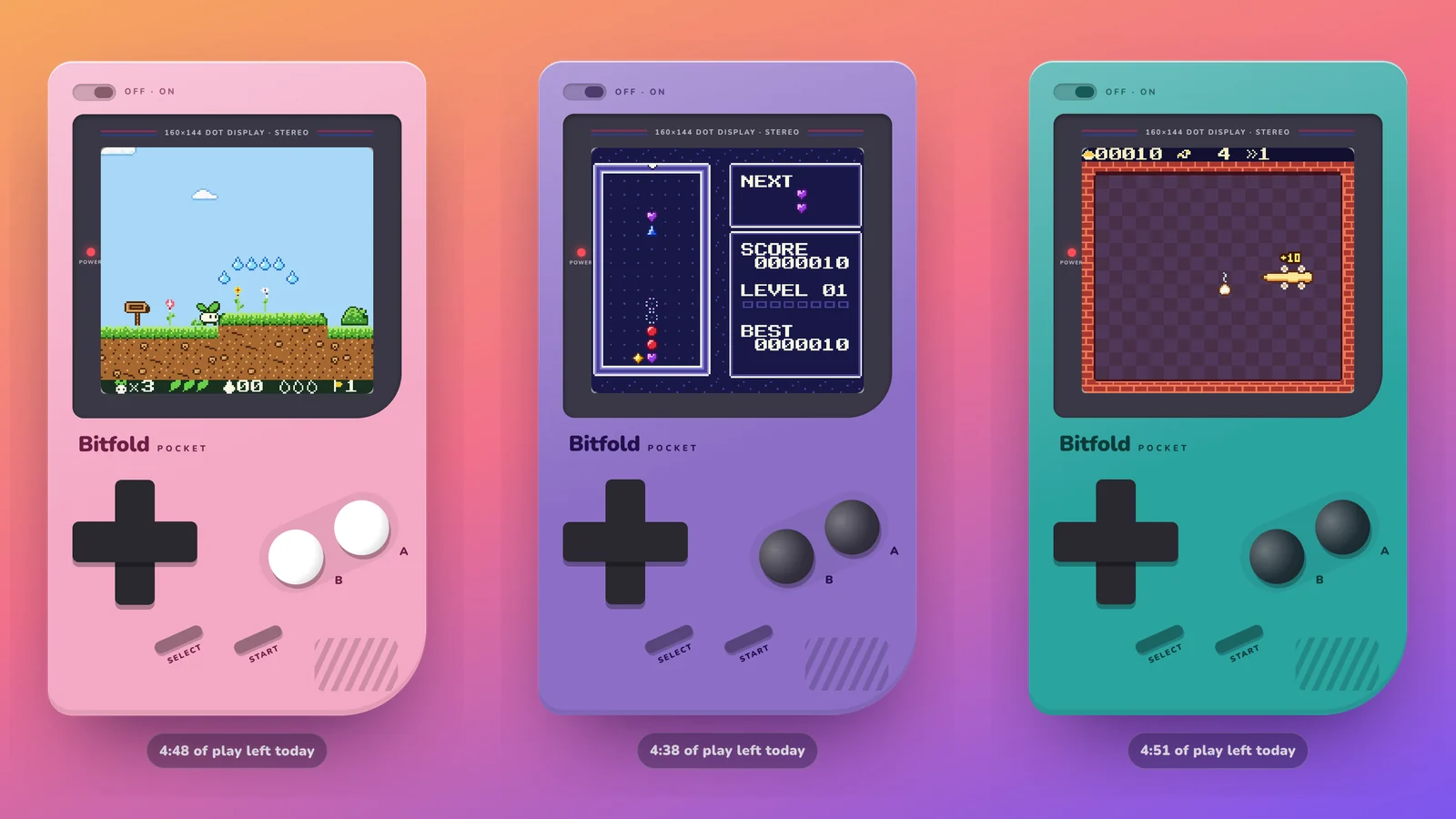
Ten cartridges, 800 KB in all
Each game is a Bitfold Original, with its own code, art, music and characters. The table lists them in the order Bitfold’s library shows them, with each cartridge’s size and the trick it needed.
| Game | Genre | Cartridge | Code | The trick it needed |
|---|---|---|---|---|
| Sprout’s Quest | Platformer, four worlds | 128 KB | C and assembly | Levels up to 262 tiles wide, streamed into a 32-tile map one column per frame |
| Lantern Keep | Action-adventure, 26 rooms | 128 KB | C and assembly | Dark-room lighting recomputed a few tiles per frame |
| Nova Courier | Vertical shooter | 64 KB | C and assembly | Sprites drawn in a rotating order, so a crowded line flickers and no sprite stays hidden |
| Turbo Lane | Pseudo-3D racer | 64 KB | C and assembly | An interrupt that changes the scroll position on every road line |
| Prism Drop | Falling-gem puzzle | 32 KB | C | A list of changed cells, so matching only scans around gems that moved |
| Tidepool Pinball | Pinball, two screens tall | 128 KB | C and assembly | A collision map that lets the ball be tested as a single point |
| Pixel Postcards | Picture logic, 45 puzzles | 64 KB | C | A line solver that rejects any puzzle that needs a guess |
| Pocket Links | Mini golf, 18 holes | 128 KB | C and assembly | A host simulator that finds a one- or two-stroke solution for every hole |
| Noodle | Snake, ten three-star stages | 32 KB | C | Each board cell stores the direction the noodle entered it |
| Brick Bounce | Block breaker, 15 stages | 32 KB | C | Separate horizontal and vertical sub-steps, so the ball never passes through a brick |
All ten are MBC1 cartridges with 8 KB of battery-backed RAM for high scores and progress. The sizes come from the shipped files.
The hardware limits that shaped every game
Every game targets two models of the handheld. The original has a monochrome screen that shows four shades of green, and a CPU clocked at 4.19 MHz. Its colour successor can run the same CPU at 8.39 MHz, has twice the video memory and four times the work RAM, and picks its colours from 32,768.1 The screen, the sprites and the sound are the same on both.
| Limit | Monochrome original | Colour successor | What it meant for our games |
|---|---|---|---|
| Screen1 | 160 × 144 pixels | Same | Pixel Postcards shows 13 of a 15 × 15 puzzle’s rows and scrolls the rest |
| Frame2 | 154 scanlines, 144 of them drawn, about 59.7 a second | Same | Work is budgeted in scanlines |
| CPU1 | 4.19 MHz | Up to 8.39 MHz | All ten switch to the faster clock on colour hardware, so the original sets the budget |
| Tiles3 | 8 × 8 pixels at 2 bits a pixel, 16 bytes each; 384 fit in video memory | 768, in two banks | Each game plans which tile numbers hold the font, the HUD and the level art |
| Background4 | Two maps of 32 × 32 tiles | Each tile can also pick a palette, a bank and a flip | Wider levels stream in a column at a time |
| Sprites5 | 40 on screen, 8 × 8 or 8 × 16, at most 10 per scanline | Same | Sprite pools, rotating draw order and caps on effects |
| Palettes1 | 1 background palette of 4 shades, 2 sprite palettes of 3 | 8 background palettes of 4 colours, 8 sprite palettes of 3 | Every screen has to read in four shades |
| Sound6 | 4 channels: two pulse (one with a pitch sweep), one wave, one noise | Same | One shared music format for melody, harmony, bass and drums |
| Cartridge ROM78 | 32 KB without a mapper, 16 KB banks with one | Same | Three games fit in 32 KB and seven use banking |
| Save RAM9 | 8 KB with a battery, on our cartridges | Same | High scores and progress, stored with a checksum |
Past 10 sprites on one scanline, the hardware draws the first 10 it finds in sprite memory and skips the rest.5 Without a mapper chip, 32 KB is the whole game, mapped straight into the CPU’s address space.7 With one, bank 0 stays fixed in the lower 16 KB, and the upper 16 KB is a window the game can point at any other 16 KB bank.8
Colour, with a fallback for the monochrome model
All ten cartridges set the header flag for a game that supports colour and still runs on the monochrome model.9 At boot, a helper shared by all ten checks the hardware and, on the colour model, calls GBDK-2020’s cpu_fast() to double the clock. The same code gets half the CPU time on the original, and that’s the machine we budget for.
Each game makes four shades work in its own way. Prism Drop gives each of its five gem kinds its own shape, from a round ruby to a heart-shaped amethyst. Lantern Keep’s palettes all run from light to dark, so the monochrome model shows the same picture. Brick Bounce’s stage files give every brick colour a light, mid or dark shade for monochrome as well as its RGB value.
When the original runs out of CPU, the games cut back in planned ways. Turbo Lane draws the race every second frame there, 30 times a second. Its raster effect, simulation, clock and music still run every frame, so the race keeps its speed. To keep slower frames rare, it also skips the smallest, most distant cars and every second bend sign. Lantern Keep recomputes at most 10 lighting tiles a frame on colour hardware and 4 on the monochrome model.
The GBDK-2020 toolchain: C, ASCII art and generators
GBDK-2020 is a cross-platform development kit for consoles built on the SM83, Z80 and 6502 processors, with libraries, tools and the SDCC C compiler.10 Its licence file says a compiled ROM needs no licence notice or credit, unless it uses the library’s zx0 decompression.11 We use version 4.5 with SDCC 4.5. As of 30 October 2026, 4.5.0 is the latest release, from December 2025.12 Our builds run in a Linux chroot. GBDK-2020 4.5.0 on a Mac builds the games too, but its ROMs aren’t byte-identical to the chroot’s. On a Mac we rebuild only the game we changed.
Each game is a folder with a manifest, C sources, art and generators. One Python script builds all ten the same way, taking settings such as the 15-character header title, the colour mode and any extra compiler flags from the manifest.
Graphics are ASCII art. A .tiles file draws each tile, image or sprite with a full stop and the digits 1 to 3, one character per pixel. A converter turns the file into C during the build. Each 8-pixel row becomes two bytes. The first holds the low bit of every pixel’s colour number and the second holds the high bit.3 This is a gem.
tile gem
..3333..
.312213.
31122113
31111113
.311113.
..3113..
...33...
........
Its second row, .312213., becomes 0x66, 0x5A. The converter also writes a header with a named constant for the first tile of each block, and game code refers to tiles by those names.
Levels, rooms, golf holes, puzzles and brick stages are text maps too, and music is written in a note notation. Python generators compile them into C files marked as generated. Those files are committed, so a normal build doesn’t rerun the generators. The generators also check the content. Sprout’s Quest’s level tool requires exactly three golden seeds and one goal per level, and enemies that stand on the ground. Pocket Links’ hole compiler checks for closed borders and a reachable cup.
Nine of the games play sound through one small shared engine, and Nova Courier plays the same format through its own driver. A song is one byte stream per channel, with melody and harmony on the two pulse channels, bass on the wave channel and drums on the noise channel. A sound effect borrows a channel from the music until it ends.
Label art comes from the emulator. After the build, the script runs each cartridge headless in bitfold-cli, Bitfold’s command-line runner, for a set number of frames and saves the screen as the cartridge’s label. Eight of the ten use 240 frames, about four seconds, which lands on the title screen.
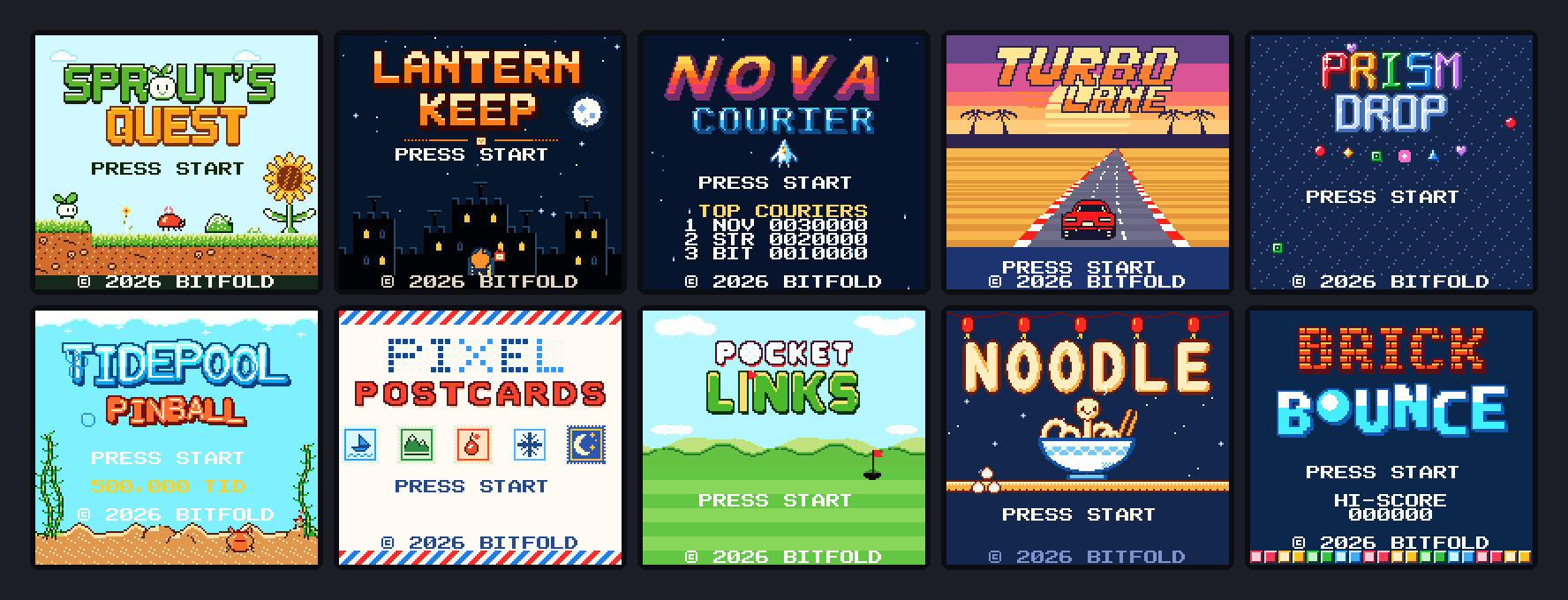
The build writes two files per game, a standard cartridge image for original hardware and the copy that ships inside Bitfold. The script recomputes the header checksum for both, since the boot ROM on original hardware locks up when it’s wrong.9
ROM banking, and the build check that fails on overlap
Prism Drop, Noodle and Brick Bounce fit in 32 KB and never switch banks. Their headers still declare an MBC1 mapper with battery-backed RAM, because that’s where the high scores live. The other seven switch banks, at 64 KB or 128 KB. Cartridge ROM sizes double from 32 KB,9 so Sprout’s Quest, which uses five 16 KB banks, ships as a 128 KB cartridge of eight.
GBDK-2020 can place banked code and data for you. A source file marked #pragma bank 255 goes into whichever bank has room when you build with -autobank, and BANKREF and BANK() tell the code which bank that was.13 Bank 0 is the only bank that’s always mapped, so the first decision in a banked game is what lives there. Ours holds the interrupt handlers, the sound driver, the bank-switching helpers and the hottest engine code. Levels, art, music, menus and most game logic can go anywhere. Here is banked data read through a helper in bank 0.
/* level.c: no fixed bank, the linker picks one */
#pragma bank 255
BANKREF(meadow)
const uint8_t meadow[] = { 0x01, 0x02, 0x03 /* ... */ };

/* main.c, in bank 0 */
BANKREF_EXTERN(meadow)
extern const uint8_t meadow[];

void load_meadow(uint8_t *dst, uint16_t size) {
    uint8_t saved = CURRENT_BANK;
    SWITCH_ROM(BANK(meadow));   /* map the level's bank into the window */
    memcpy(dst, meadow, size);
    SWITCH_ROM(saved);          /* put the caller's bank back */
}
Lantern Keep uses about 83 KB of its 128 KB. Six of its source files each own a fixed bank, from 1 to 6, and autobanking places the generated rooms, tile sets, text and art.
The failure our build guards against is overlap. If bank 0 outgrows its 16 KB, it spills into bank 1, and if autobanking has already put data there, code and data claim the same bytes. GBDK-2020’s tools print a warning and write the broken ROM anyway. Its documentation says the toolchain can only warn when one bank overflows into another that has data at its start. It can’t warn at all when a bank overflows into an empty one.13 Our build script turns the warning into an error.
result = subprocess.run(command, capture_output=True, text=True)
output = result.stdout + result.stderr
if result.returncode != 0 or "Multiple write" in output:
    sys.exit("overlapping ROM areas:\n" + output)
The fix is to move code out of bank 0 into banked files. Pocket Links adds a second check, a script that runs romusage, the bank-usage tool GBDK-2020’s documentation recommends, and fails when any bank is 99% full.
Frame budgets, hand-written assembly and three compiler bugs
For 8-bit game development in C, everything is budgeted per frame. There are about 59.7 frames a second, and each one is 154 scanlines long, 144 drawn and 10 of vertical blank.2 Most of our games have a test build that records the worst frame, and their notes give it in scanlines out of 154 or as a share of late frames.
| Game | Monochrome original | Colour successor |
|---|---|---|
| Pocket Links | Slowest frame 140 of 154 scanlines; no late frames in the replay and stress tests | No late frames |
| Sprout’s Quest | Busiest frames about 130 of 154 scanlines, at 60 frames a second | Not recorded separately |
| Noodle | About 125 of 154 scanlines in the demo, no dropped frames | Not recorded |
| Pixel Postcards | About 105 of 154 scanlines, no dropped frames | Not recorded |
| Prism Drop | Every frame fits in one video frame | Every frame fits |
| Brick Bounce | 60 frames a second, apart from about 1 frame in 1,000 in the busiest stages | 60 frames a second with plenty of headroom |
| Tidepool Pinball | Under 1% of frames late with one ball, about 1 in 8 in three-ball multiball | None late with one ball, about 1 in 5,000 in multiball |
| Nova Courier | Can drop the odd frame in the busiest moments | Plenty of headroom |
| Turbo Lane | Race drawn at 30 frames a second, by design | 60 frames a second |
The techniques repeat from game to game. Positions and velocities are 8.8 fixed point, and directions, sines and arctangents come from lookup tables that Python scripts generate. Nova Courier’s velocity table holds 64 directions at 12 speeds, and Pocket Links’ physics uses no division at all. Background changes wait in a queue that’s written to video memory during vertical blank. GBDK-2020’s coding guidelines give much the same advice. They recommend 8-bit and unsigned values, static variables over stack locals, few multiplications and divisions, lookup tables, and assembly for the most intensive functions.14
Prism Drop, Pixel Postcards, Noodle and Brick Bounce are written entirely in C. The other six use hand-written SM83 assembly where the frame is tight. Sprout’s Quest uses it for tile lookups and sprite output, Nova Courier for bullets and collision scans, Turbo Lane for its road builder and Tidepool Pinball for each ball’s physics step. Sound costs frame time too. The shared C sound engine needs 10 to 25 scanlines a frame on the monochrome model. Nova Courier’s busiest boss patterns can’t spare that, so its own driver does the per-frame update in assembly.
Three games hit code-generation bugs in SDCC 4.5. In Sprout’s Quest, adding a negative int8_t to a uint16_t sometimes added 255 instead of subtracting 1, so the movement code adds and subtracts unsigned magnitudes explicitly. In Lantern Keep, an equality test between a register and a global variable compiled to a subtraction that destroyed the register’s value. The code after it then used the register as if nothing had changed. Lantern Keep now has a script that compiles every file to assembly and reports each case, and the fix in C is to copy the global into a local first. Tidepool Pinball hit the same pattern, plus a parameter overwritten before its next use. Its debug build compares the cartridge’s physics with the same C compiled natively, on thousands of random states, and currently finds no differences.
Testing on the SameBoy core, as colour and monochrome
Cartridge tests run in bitfold-cli, on Bitfold’s own engine, which wraps the open-source, cycle-accurate SameBoy core.15 It takes a frame count, scripted button presses such as 60:start,70:-,100:right+a,160:- and paths for screenshots. One flag runs the cartridge as the monochrome model, another keeps battery saves between runs, and a third writes the audio to a WAV file.
Each game also has compile-time test switches that the shipped ROM leaves out. Nine of the ten have a test build that plays the game by itself, and Pixel Postcards has a switch that fills in the solution. Some test builds write their results to cartridge RAM, and a Python script reads them back from the save file.
Lantern Keep’s autopilot follows routes written in a small language, and one route plays the whole game from a new save to the credits, solving every puzzle for real. A second tool explores every room as a Sokoban-style state space. It checks that every reachable state can still light all five beacons, so no sequence of moves can trap the player.
The physics games got host simulators built from the cartridge’s own C. Tidepool Pinball’s simulator drops a ball from every free pixel and runs long soaks that check it never ends up inside a wall. Pocket Links’ simulator finds, for every hole, a one- or two-stroke solution that still works with the aim three steps off, the power two steps off and the timing three frames off. A test ROM replays those shots through the real menus on both models and checks the strokes.
The cartridges are standard images built for original hardware, with a full header and correct checksums. Other emulators play them too, and our roundup of retro game apps for iPhone Duo covers some of them. The tests in our repository run on SameBoy’s models of the two machines, and this post has no measurements from a physical console.
One design note from each game
Sprout’s Quest. Each level is stored as its distinct columns plus a 16-bit index per column. The game decodes one column per frame into a 64-column ring in work RAM and draws it into the background map just ahead of the scroll.
Lantern Keep. In dark rooms you see only what the hero’s lantern and any lit braziers reach. When the lantern moves one tile, a table lists the 32 tiles whose light can change, and only the tiles that do change are redrawn.
Nova Courier. Its pools hold 10 enemies, 18 enemy bullets, 12 player shots, 10 effects and 2 capsules, all drawn from the 40 hardware sprites. The ship and enemy bullets are drawn first, and everything else swaps order every frame. On a line with more than 10 sprites, the extras take turns and flicker.
Turbo Lane. The background holds one straight road drawn in perspective. Each frame the game builds a table of scroll values, one pair per screen line. An interrupt at the start of each horizontal blank loads the next line’s pair in 45 machine cycles, counting the interrupt dispatch.16 Curves shift each line sideways. Hills change how much road each line covers, which squeezes the road behind a crest and can hide the cars beyond it.
Prism Drop. The well has sentinel borders and a list of changed cells, so the match scan only follows lines through gems that just landed or fell. A clear is found in one frame and starts in the next.
Tidepool Pinball. The table is 160 × 256 pixels, exactly one background map, and the camera is just the vertical scroll. The collision map has an entry for every pixel the ball’s centre can occupy, saying whether the spot is free, a sensor or solid, with a surface normal in one of 64 directions. That lets the game test the ball as a single point.
Pixel Postcards. The puzzle compiler rejects any puzzle that a line-by-line solver can’t finish without guessing. The cursor row is a raster effect that tints the paper on those scanlines, and the cursor column is a stack of sprites behind the background. Moving the cursor writes no tiles at all.
Pocket Links. Positions are 8.8 fixed point, angles come in 1,024 steps and rails return 13/16 of the ball’s speed. The cup pulls in a ball that arrives close and slow enough, and a fast one lips out.
Noodle. Each cell the noodle occupies remembers the direction it entered from, which picks a straight, bend, tail or head tile. The death wiggle and the victory dance change the tile graphics themselves, which animates every piece of the noodle at once, however long it is.
Brick Bounce. The ball moves in one or two sub-steps a frame and resolves the two axes separately against the grid, so it never tunnels at full speed. A ball that bounces 14 times without touching the paddle or a breakable brick gets its angle nudged, which breaks loops between steel bricks and walls.
How the numbers in this post were measured
Cartridge sizes, mapper types, save RAM sizes and colour flags come from the headers of the ten shipped cartridge files, read on 30 October 2026. Frame figures, soak results and simulator results come from each game’s design notes and source comments in our repository. They record runs of debug builds in bitfold-cli on SameBoy, plus the native simulators for the two physics games. Debug builds carry counters the shipped ROMs don’t. Lantern Keep’s notes give no frame figure, and no figure here comes from a physical console. Hardware limits come from Pan Docs and GBDK-2020’s documentation, read on 30 October 2026.
What we’d do again: a checklist for your first 8-bit game
If you want to make 8-bit games for the classic handheld today, this is the list we’d start from.
- Use GBDK-2020 4.5.0, the latest release as of 30 October 2026, and build every ROM on one pinned toolchain.
- Aim for 32 KB without banking. Three of our ten fit, with no bank-switching code at all.
- In a banked game, decide first what stays in bank 0. Ours holds interrupt handlers, the sound driver, bank-switching helpers and the hottest loops.
- Make the build fail on overlapping ROM areas, and check bank usage with romusage.
- Keep art, maps and music as text. Generate C from them, commit the output and never edit it by hand.
- Make every generator check its content, from item counts to reachability and solvability.
- Design for four shades and the monochrome model’s CPU, then add colour.
- Budget in scanlines, and build a worst-frame counter on the first day.
- Keep sprites under 10 per line by design, and rotate the draw order where you can’t.
- Give the game an autopilot and soak it on both models.
- When a bug appears only on the cartridge, read the assembly the compiler wrote.
-
Pan Docs, “Specifications”, https://gbdev.io/pandocs/Specifications.html ↩↩↩↩
-
Pan Docs, “Rendering”, https://gbdev.io/pandocs/Rendering.html ↩↩
-
Pan Docs, “Tile Data”, https://gbdev.io/pandocs/Tile_Data.html ↩↩
-
Pan Docs, “Tile Maps”, https://gbdev.io/pandocs/Tile_Maps.html ↩
-
Pan Docs, “OAM”, https://gbdev.io/pandocs/OAM.html ↩↩
-
Pan Docs, “Audio”, https://gbdev.io/pandocs/Audio.html ↩
-
Pan Docs, “No MBC”, https://gbdev.io/pandocs/nombc.html ↩↩
-
Pan Docs, “MBC1”, https://gbdev.io/pandocs/MBC1.html ↩↩
-
Pan Docs, “The Cartridge Header”, https://gbdev.io/pandocs/The_Cartridge_Header.html ↩↩↩↩
-
GBDK-2020, project README on GitHub, https://github.com/gbdk-2020/gbdk-2020 ↩
-
GBDK-2020, “LICENSE”, https://github.com/gbdk-2020/gbdk-2020/blob/develop/LICENSE ↩
-
GBDK-2020 documentation, “GBDK Release Notes”, https://gbdk.org/docs/api/docs_releases.html ↩
-
GBDK-2020 documentation, “ROM/SRAM Banking and MBCs”, https://gbdk.org/docs/api/docs_rombanking_mbcs.html ↩↩
-
GBDK-2020 documentation, “Coding Guidelines”, https://gbdk.org/docs/api/docs_coding_guidelines.html ↩
-
SameBoy, project README on GitHub, https://github.com/LIJI32/SameBoy ↩
-
Pan Docs, “LCD Status Registers”, https://gbdev.io/pandocs/STAT.html ↩
Frequently asked questions
What is GBDK-2020?
GBDK-2020 is an open-source development kit for writing games in C for consoles built on the SM83, Z80 and 6502 processors, the classic 8-bit handheld among them. It bundles libraries, tools and the SDCC compiler. As of 30 October 2026 its latest release is 4.5.0, from December 2025.
How do you make 8-bit games in C today?
Write the game in C with GBDK-2020, keep art, levels and music as text files that scripts turn into C, and test every build in an accurate emulator such as SameBoy, on both the colour and the monochrome model. We built ten games this way, from 32 KB to 128 KB.
What is ROM banking?
The classic 8-bit handheld’s CPU sees 32 KB of cartridge ROM at a time. On bigger cartridges a mapper chip keeps the first 16 KB fixed and switches other 16 KB banks into the upper half, so a game can be larger than 32 KB. GBDK-2020 can assign code and data to banks automatically.
Is C fast enough for 8-bit game development?
For most of a game, yes. Four of our ten games are written entirely in C, and the other six use hand-written assembly only in hot paths such as sprite output, bullets, a raster road and pinball physics.
How many sprites can an 8-bit handheld show at once?
The classic 8-bit handheld shows up to 40 sprites of 8 × 8 or 8 × 16 pixels, with at most 10 on one scanline. Past ten, the hardware skips the rest of that line’s sprites. Games keep sprites apart, or rotate their draw order so the extras flicker instead of disappearing.
Do homebrew handheld games run on original hardware?
They do when they’re built as standard cartridge images, with a valid header, correct checksums and a mapper the hardware supports. Our ten games are built that way, and they also play in Bitfold and in other emulators.
Building something like this?
9io is a small team of senior engineers with a fractional CTO. We work by the hour, and plans start at $5,000. Send us a note about your product. The reply comes from the person who'd do the work.