
Key takeaways
- Football Kick, Bitfold and Pockling are free on the App Store, with no ads or in-app purchases.
- All three went live on 5 November 2026. Bitfold 1.1 and Pockling 1.1 followed on 6 November.
- Football Kick and Bitfold are made for iPhone Duo. Pockling’s listing doesn’t mention the fold.
- Bitfold 1.1 added Paper Harbor, a daily puzzle, and a Pockling cartridge, for twelve Originals.
- The Pockling app and the Pockling cartridge in Bitfold are separate games with separate saves.
Football Kick, Bitfold and Pockling are three free iPhone games with no ads, and we make all three at 9io. They went live on the App Store on 5 November 2026, for iPhone and iPad with iOS 17 or later, and Bitfold 1.1 and Pockling 1.1 followed on 6 November. None of them has in-app purchases or accounts, and each App Store page says the app collects no data.
Football Kick is a one-finger football game and Bitfold is a retro game console app with twelve original games. Both are games made for iPhone Duo. Pockling is a tiny virtual pet that can never die. All three have free versions you can try in a web browser first.
Each game gets a section below, followed by a comparison table, what the 1.1 updates added, how the Pockling app differs from the Pockling cartridge inside Bitfold, and a rule for which one to try first.
Football Kick: one-finger football made for iPhone Duo
Football Kick is a football (soccer) game you play by swiping through the ball. Swipe speed is power, a longer swipe lifts the ball, a curved swipe bends it, and the wind matters. On the App Store it’s Football Kick Live: Soccer, on version 1.0.
The app is built around a World Tour of 30 levels across six grounds, from the Training Ground at golden hour to the Storm Cup in sideways rain and the World Final, each with its own keeper and weather. Just Kick, one tap from the home screen, gives you penalties with no wind, a friendly keeper and a helping hand on every swipe. There’s also a Shootout against the CPU or a friend on one phone, a Daily Kick that’s the same for everyone that day, and Quick Play, Streak and Practice. The keepers react to the ball in flight and the better ones learn your favourite corner, as our post on Football Kick’s goalkeeper AI explains.
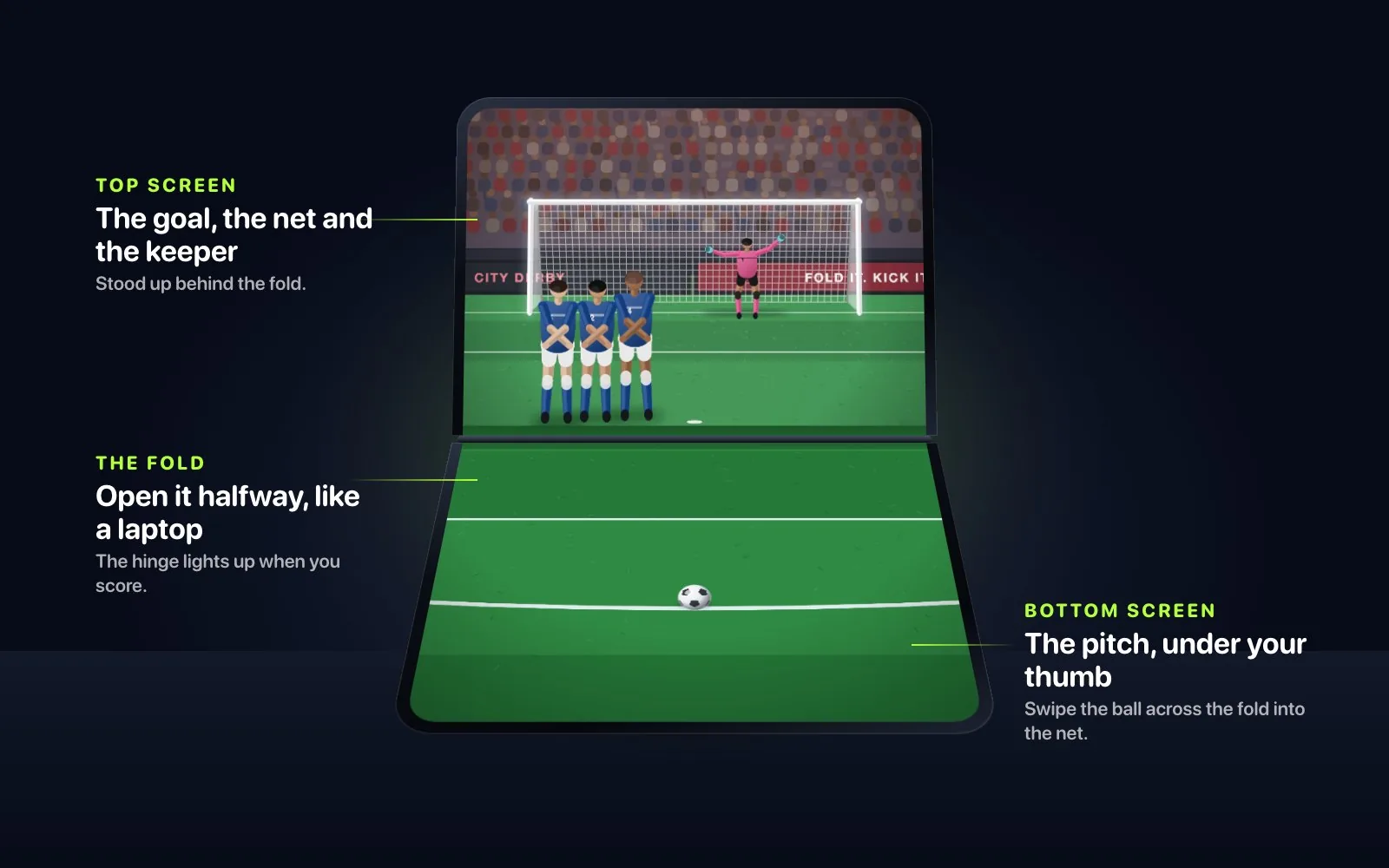
On iPhone Duo, fold the phone like a laptop and stand it on a table. The bottom half lies flat as the pitch, the top half stands up as the goal, and you swipe the ball across the fold into the net. The floodlights come on as you fold, and when you score the hinge lights up like goal-line technology. Folded like a book, one page shows a camera behind the net. Closed, it plays on the outer display.
Free in the browser, footballkicks.9io.ai runs the app’s own engine in Just Kick, Penalties and Streak, for five minutes of play a day with no sign-up. Free kicks, the World Tour and the iPhone Duo views stay in the app. The Football Kick launch post covers how the game was built.
Bitfold: a retro game console app with twelve Originals
Bitfold turns the whole screen of an iPhone or iPad into a pocket console, down to the power LED and the speaker grille, in twelve colour editions. It’s listed as Bitfold: Retro Game Emulator, and its emulation runs on the open-source SameBoy core. You can hold a button to rewind, fast-forward up to 8× and use four save-state slots, and game controllers and keyboards work too.
The Bitfold app comes with twelve Bitfold Originals, cartridges we wrote for it with GBDK-2020 that also run on original handheld hardware. They range from a platformer and a vertical shooter to a pinball table, mini golf and picture-logic puzzles. You can also play backups of cartridges you own (.gb, .gbc, .sgb, .cgb or .zip files) from Files, AirDrop or Bitfold’s folder in the Files app. Bitfold includes and downloads no commercial games, and it never connects to the internet.
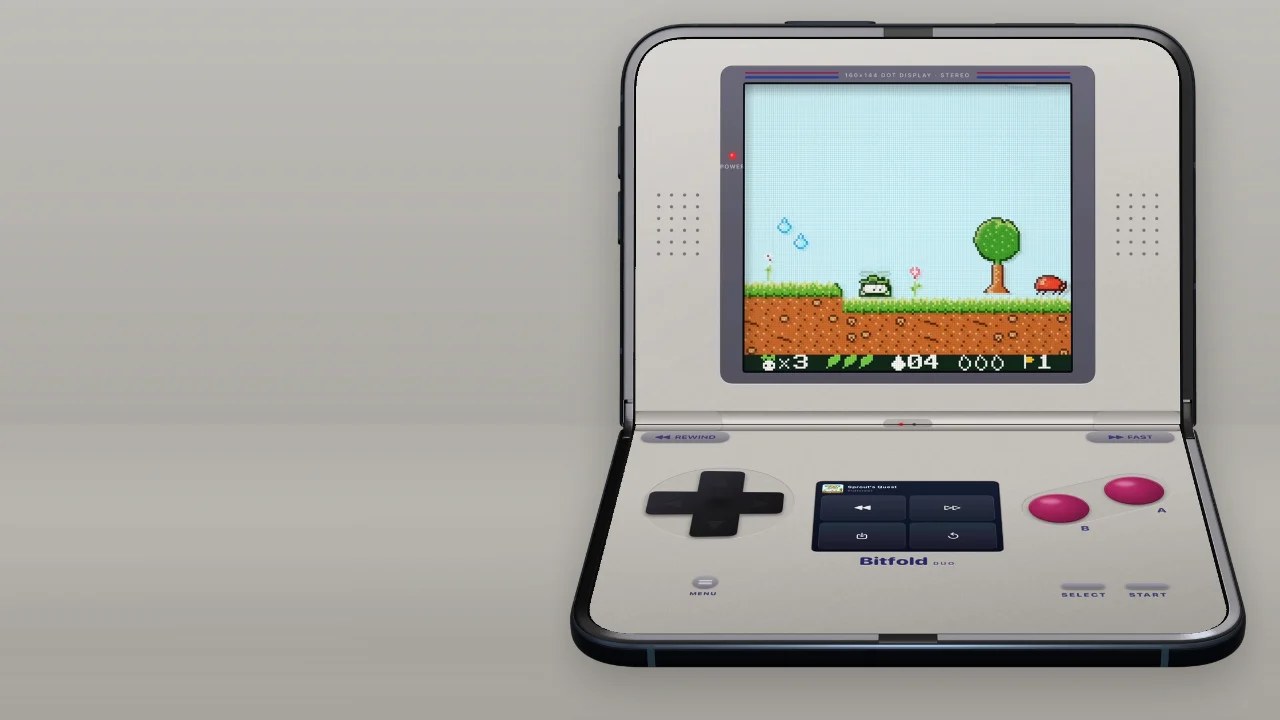
On iPhone Duo, Bitfold changes shape with the phone and the game keeps running. Closed, it’s a pocket console on the outer display. Folded like a laptop, it becomes a clamshell with the game on the top half, the console’s hinge drawn over the real fold, and the controls and a companion screen below. Folded like a book, it opens into two pages, so nothing sits on the crease. Our post on Bitfold’s clamshell layout shows how it fits the fold.
Free in the browser, bitfold.9io.ai/play runs Sprout’s Quest, Prism Drop and Noodle for five minutes a day with no sign-up. The Bitfold launch post covers how we built the app.
Pockling: a tiny virtual pet that can never die
Pockling is a very small, very fluffy virtual pet for iPhone and iPad, listed as Pockling: Cute Virtual Pet. You pick one of six eggs, tap it six times until it cracks and name what hatches. The egg decides the kind, from Kitling to Drakling, and the coat, one of four for each kind, is a surprise.
Stroke it and it purrs, and in the app you feel the purr as haptics. You feed it by dragging snacks to its mouth, bath it, walk it on a lead and play games with it, and it repeats what you say in a squeaky voice. Nothing you say leaves your device. It lives on the real clock. The sky through its window follows your day, you tuck it into bed under a star projector when it’s sleepy, and it grows from Baby to Kid after 2 days of care and to Grown after 7. Berries you collect buy treats, outfits and rooms.
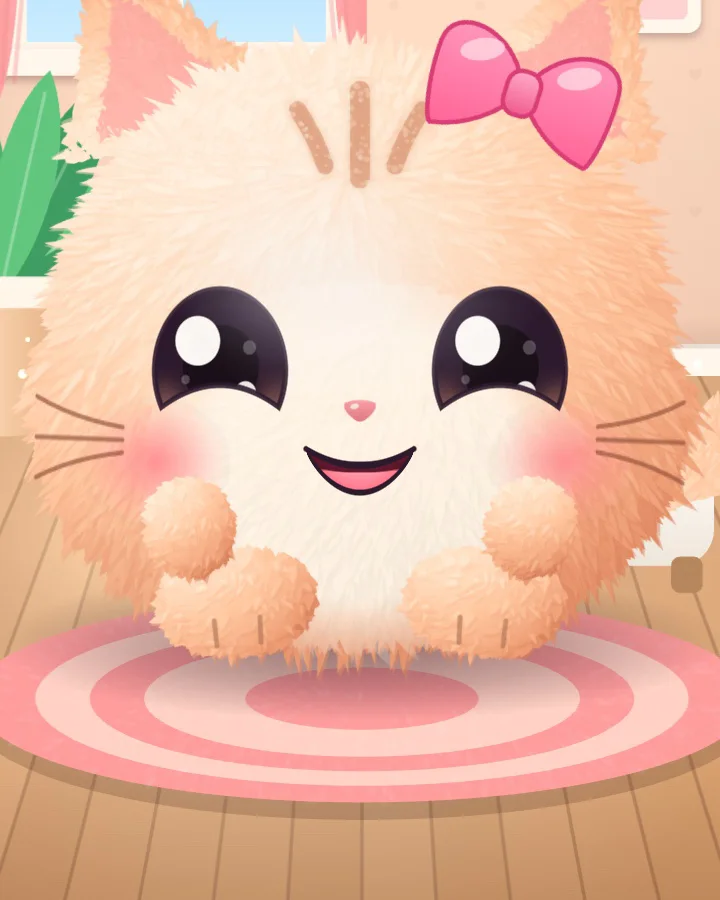
Pockling has no ads, no in-app purchases, no accounts and no timers that nag you. It can never die or run away, and time away never takes any of its needs below 14 out of 100, so after a long gap it’s just very glad to see you.
Free in the browser, bitfold.9io.ai/pockling runs the same game as the app, which wraps that web game in a small native layer. It’s free, with no sign-up and no time limit. It saves in that browser, and clearing the browser’s data starts a new egg.
Three free iPhone games with no ads, side by side
The table puts the three App Store listings and browser versions together, as of 6 November 2026. All three need iOS 17 or later and run on iPhone and iPad, and each App Store page says “Data Not Collected”.
| Football Kick | Bitfold | Pockling | |
|---|---|---|---|
| What you do | Swipe through the ball to beat the wind, the wall and the keeper | Play twelve original cartridge games, or backups of your own | Hatch a pet, then feed, wash, walk and cuddle it |
| App Store name | Football Kick Live: Soccer | Bitfold: Retro Game Emulator | Pockling: Cute Virtual Pet |
| Version | 1.0, since 5 November | 1.1, since 6 November | 1.1, since 6 November |
| Price | Free | Free | Free |
| Ads and in-app purchases | None | None | None |
| Category and age rating | Sports, 4+ | Action, 9+ | Simulation, 4+ |
| Size on the App Store | 9.7 MB | 14.3 MB | 3.8 MB |
| iPhone Duo | The pitch lies flat and the goal stands up; a camera behind the net when folded like a book | A pocket console when closed, a clamshell folded like a laptop, two pages folded like a book | None in its listing |
| Browser version | Just Kick, Penalties and Streak, five minutes a day | Three Originals, five minutes a day | The whole game, no time limit |
Bitfold’s App Store page gives infrequent cartoon or fantasy violence as the reason for its 9+ rating. For other developers’ games that use the fold, see our roundup of the best iPhone Duo games so far.
What Bitfold 1.1 and Pockling 1.1 added
Both updates went live on 6 November 2026, a day after 1.0. Football Kick is still on 1.0.
Bitfold 1.1 adds two Originals, taking the shelf from ten to twelve. Paper Harbor, the eleventh, is a daily puzzle. A new harbour opens every day at midnight, the same for everyone, and each press of the D-pad is a gust of wind that sails every paper boat until it bumps into something. You dock each boat at its own pier in as few gusts as you can, then share a result card that never shows the harbour and keep your streak going. Pockling, the twelfth, is a virtual pet cartridge, covered in the next section. The update also changes the shelf and how files come in:
- You can delete an imported game from its long-press menu on the shelf.
- The shelf’s text follows your Larger Text setting.
- Games tapped in Bitfold’s folder in the Files app open straight away.
- Zips made on a Mac import the right game, and files that aren’t games stay off the shelf.
- A damaged save state no longer changes the game you’re playing.
Pockling 1.1 gives the pet more to say. It coos while you stroke it, hearts chime as they pop up, and it hums and sings as it plays. Swing it around for a “wheee!”, and the purr now comes through phone speakers more clearly.
Pockling the app and Pockling the Bitfold cartridge
The Pockling cartridge in Bitfold 1.1 is a separate game from the Pockling app. Both start with six patterned eggs, live on the real clock, keep a daily stamp book and can never die. The cartridge was written for the classic 8-bit handheld like the other Originals, so you play it with the D-pad and buttons.
| Pockling app | Pockling in Bitfold | |
|---|---|---|
| How you play | By touch: stroke it, boop it, drag snacks to its mouth | With buttons: A to pet it, the D-pad to scrub it in the bath |
| The pets | Six kinds, each in four coats | Six breeds, one colour each |
| Food | 12 foods; each kind loves one and can’t stand one | Fish, carrot, cookie, honey, pepper, and berries from walks |
| Games | Fetch, Snack Drop, and Hide and Seek | Snack Catch, 40 seconds of falling snacks |
| Growing up | Kid after 2 days of care, Grown after 7 | Kid after 3 days of care, grown after 7; a day of care takes two different kinds of care |
| Extras | Talk-back, 15 outfits, 6 rooms, a purr you can feel | A pet card to save and share with Bitfold’s Photo and Share |
Saves don’t cross over. The app keeps its pet inside the app, the browser version keeps its own in that browser, and the cartridge saves inside Bitfold like any other game, so a pet hatched in one won’t turn up in another.
Which one to try first
Pick by where you’ll play and how long you have.
- You have an iPhone Duo and a table: Football Kick. Fold the phone like a laptop and the goal stands up behind the fold.
- You have a spare minute and one free hand: Football Kick’s Just Kick, one tap from the home screen.
- You want one puzzle a day, retro games, or a home for your cartridge backups: Bitfold, starting with Paper Harbor.
- You want something calm to come back to each day: Pockling. It’s rated 4+ and has nothing to buy.
- You’re not sure yet: try the browser versions. Football Kick and Bitfold give you five minutes a day there. Pockling has no limit, though a pet hatched in the browser stays in that browser.
Each game has its own guides. For Football Kick, read the World Tour guide and the tips. For Bitfold, read the guide to all twelve Originals, how Paper Harbor works and how to play backups of your own cartridges. For Pockling, read its launch post and the guide to every kind, coat and food.
Frequently asked questions
Are there free iPhone games with no ads?
Yes. Football Kick, Bitfold and Pockling, which we make at 9io, are free on the App Store with no ads and no in-app purchases, and each App Store page says no data is collected. All three also play free in a web browser.
What is Football Kick Live: Soccer?
It’s the App Store name of Football Kick, a free one-finger football game for iPhone and iPad, made for iPhone Duo. You swipe through the ball to shoot, in a 30-level World Tour and six other modes.
Is Bitfold made for iPhone Duo?
Yes. Closed, Bitfold is a pocket console on the outer display. Folded like a laptop it becomes a clamshell with the console’s hinge drawn over the real fold, and folded like a book it opens into two pages. It also runs on any iPhone or iPad with iOS 17 or later.
Is the Pockling app the same as Pockling in Bitfold?
No, they are separate games. The app is played by touch, with six kinds in four coats each, talk-back and three mini-games. The Bitfold Original is a cartridge game played with the D-pad and buttons, with its own foods, Snack Catch, and growth after 3 and 7 days of care.
Can I play Bitfold, Football Kick or Pockling in a browser?
Yes. bitfold.9io.ai/play runs three Bitfold Originals and footballkicks.9io.ai runs Just Kick, Penalties and Streak, each free for five minutes a day with no sign-up. Pockling plays in full at bitfold.9io.ai/pockling, with no time limit.
What’s new in Bitfold 1.1?
Two more Bitfold Originals, Paper Harbor and Pockling, for twelve in all. Paper Harbor is a daily puzzle with a new harbour every midnight. You can also delete imported games from the shelf, and games tapped in Bitfold’s folder in the Files app open straight away.
Building something like this?
9io is a small team of senior engineers with a fractional CTO. We work by the hour, and plans start at $5,000. Send us a note about your product. The reply comes from the person who'd do the work.